

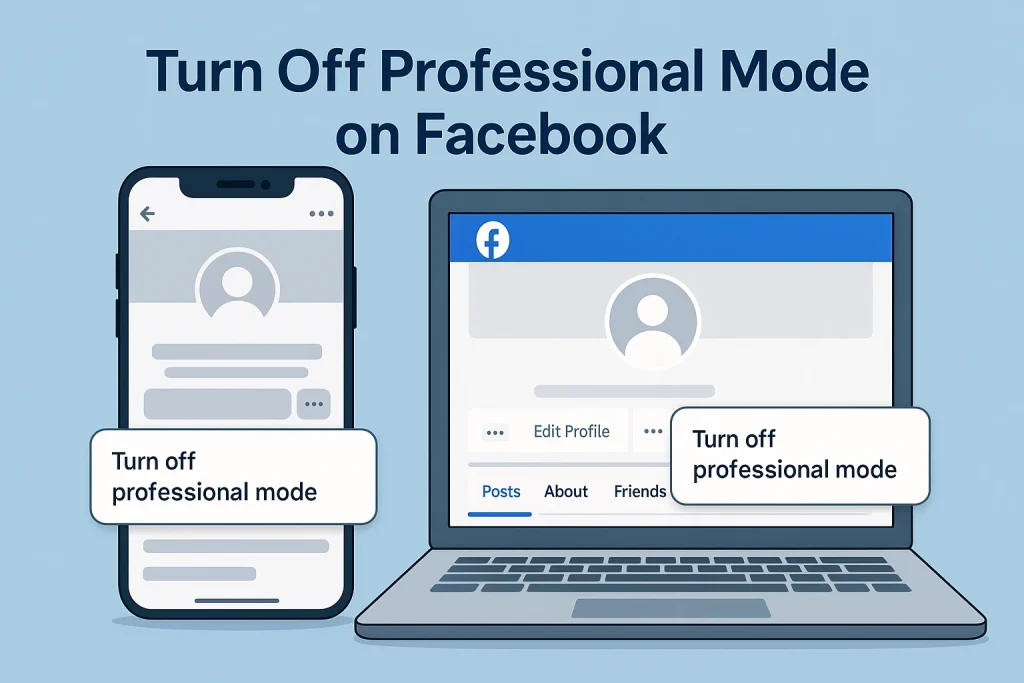

How to Turn Off Professional Mode on Facebook (Quick 30-Second Answer)
Here’s the short version: go to your profile, open the three-dot menu, tap or click “Turn off professional mode”, then confirm. That’s it.
On mobile (iPhone or Android), the flow usually looks like this in 2025:
-
Open the Facebook app and log in.
-
Tap your profile picture to go to your profile.
-
Tap the three dots next to Edit profile or See dashboard.
-
Look for “Turn off professional mode” (sometimes under Settings → Professional mode).
-
Tap Continue, then Turn off to confirm.
On desktop (facebook.com), the button is in a slightly different place:
-
Click your profile picture (top right) to open your profile page.
-
Under your cover photo, find the three-dot menu to the far right of the tabs like Posts, About, Reels, Friends, etc.
-
Click “Turn off professional mode”.
-
Confirm when Facebook shows what you’ll lose (insights, monetization tools, professional dashboard).
What Facebook Professional Mode Is — And Why Many Users Turn It Off
Facebook Professional Mode is basically a creator layer on top of your normal profile. When you switch it on, your profile starts behaving a bit more like a Page: anyone can follow your public posts, you get a Professional Dashboard, and you unlock tools like insights and (if eligible) monetization options for Reels and other content.
So why do so many people end up turning it off again?
It makes your profile more “public” and more “work-like” than a lot of people realize. When Professional Mode is on, Facebook can show your public content to a wider audience, and you see data like reach, followers, video views, and audience breakdowns in the Professional Dashboard.
Common reasons people turn it off in 2024–2025 look like this:
-
They tried creator tools out of curiosity and never used the analytics or monetization.
-
The profile suddenly feels too public: more followers, more reach, sometimes their name pops up in places they didn’t expect.
-
They’re worried about accidentally affecting private groups or communities they manage while in a “creator” context.
-
Monetization programs changed or paused and the extra complexity just isn’t worth it anymore.
What Changes When You Turn Off Professional Mode on Facebook?
You lose the pro tools, not your people or your posts. Your profile doesn’t “break.”
When you turn off Professional Mode, Facebook removes your access to the Professional Dashboard, along with creator-style analytics such as reach, audience insights, and detailed performance data for your public posts and Reels. You also lose access to monetization features that depend on Professional Mode (like certain Reels bonuses or in-stream ads) if they were available on your profile. Pending payouts usually still get processed through your payouts account, but you stop earning via that profile going forward.
Here’s what stays the same:
-
Your friends and followers are still there; Facebook doesn’t wipe your audience just because you turn a feature off.
-
Your posts, photos, and Reels remain on your profile (subject to the privacy settings you chose when you posted them).
-
Your privacy settings don’t suddenly revert; if something was “Friends only” before, it stays that way.
And here’s what goes away or changes:
-
The Professional Dashboard and its shortcut button under your cover photo.
-
Creator-focused insights and some recommendation/discovery features tied to Professional Mode.
-
Eligibility to earn money with that profile via Professional Mode–linked tools (if Meta was offering them in your region).
If you’re also wondering how Facebook decides who stands out among the people viewing your content, check out what a featured viewer on Facebook actually is.
Facebook Professional Mode vs Facebook Page — Which One Makes More Sense to Turn Off?
If you’re one person building a personal brand, Professional Mode is usually enough. If you’re building a business, team, or long-term brand, a Facebook Page is the better home.
Here’s the clean distinction as Meta describes it: a profile with Professional Mode lets an individual creator unlock tools, insights, and monetization without creating a separate Page. A Page is designed for businesses, brands, and public figures who need more advanced management features.
Think of it this way:
-
Use Professional Mode if Use a Facebook Page if You are the brand (coach, creator, freelancer, influencer). You run a business, shop, podcast, agency, organization, or team. You want one profile to reach more people, access insights, and potentially monetize your content. You need Page-only tools: ad accounts, multiple admins, branded inbox, scheduling, and advanced messaging. You’re okay with your profile being more public, with followers instead of just friends. You prefer a clear separation between your personal profile and your public/business presence.
Both can reach unlimited followers, and both can connect to the Professional Dashboard now, but Pages are still the “official” route for brands and organizations.
Can’t Find the “Turn Off Professional Mode” Option on Facebook? Try These Fixes
Start with the simplest checks:
-
Make sure you’re on your actual profile page.
On desktop, you need to be on your profile, not Home or Feed. The “Turn off Professional Mode” option is usually inside the grey three-dot menu under your cover photo, aligned with the tabs (Posts, About, Reels, Friends). -
On mobile, open Profile settings fully.
Go to your profile → tap the three dots next to Edit profile / See dashboard → scroll all the way down. A lot of users only find “Turn off professional mode” at the very bottom of that menu.
If it’s still missing, there are a few 2025-era culprits:
-
Outdated app version
Meta keeps shifting where Professional Mode lives, and older app builds sometimes don’t show the toggle at all. Updating the Facebook app is one of the official fixes creators recommend for “Professional Mode not showing.” -
Feature / eligibility changes
Professional Mode (and its monetization tools) are still region- and eligibility-based. If your account no longer meets certain criteria or Meta has changed availability in your country, the option to manage it can temporarily disappear or move. -
Use the desktop site as a fallback
Several recent guides and user reports say they could only disable it via desktop view: log in on a browser (or request “Desktop site” on mobile), open your profile, then use that same grey three-dot menu under the cover photo to find “Turn off professional mode.”
If none of that works, it’s usually a temporary UI or rollout bug rather than you “doing it wrong.”
When You Shouldn’t Turn Off Professional Mode on Facebook (Yet)
Here’s when you should probably leave Professional Mode on for now:
-
You’re earning (or close to earning) money.
Professional Mode is the gateway to things like the Professional dashboard, Stars, and the newer Facebook Content Monetization program, which lets creators get paid for Reels, videos, photos, and even text posts.
Turn it off and you lose access to those monetization tools on your profile, even if your content is performing well. If you still want creator tools and analytics but prefer using Instagram for that side of your brand, here’s a step-by-step guide on how to switch to a creator account on Instagram. -
You actually use your insights.
If you log into the dashboard to check reach, audience breakdown, or what format is driving the most engagement, that’s not “extra.” That’s your strategy. Turning off Professional Mode removes those analytics and pushes you back into posting blind. -
You’ve been invited to new programs or betas.
Meta’s newer monetization setup is rolling out via invitations inside the Professional dashboard, especially through 2024–2025 as they merge older programs into one streamlined system.
If you’ve just been invited, or you’re testing what works, it’s usually smarter to ride that out rather than turning pro mode off mid-experiment.
FAQs About Turning Off Professional Mode on Facebook (2025 Updated Answers)
Let’s hit the stuff people are actually confused (or scared) about — pulled from real threads, groups, and help articles.
Will I lose my followers if I turn off Professional Mode?
No. Your existing followers and friends stay when you turn Professional Mode off. You lose the tools, not the people.
Will I lose my posts, Reels, or photos?
No. Your content stays on your profile with the same audiences you originally chose. You just won’t see creator-style insights and pro analytics for them anymore.
Can I turn Professional Mode back on later?
Yes, in most cases you can. If your account and region are still eligible, you’ll see “Turn on Professional Mode” again in the same three-dot menu or settings area and can re-enable it.
If I turn it off and back on, do I lose old insights and stats?
You’ll lose ongoing access to pro insights while it’s off, and some historical analytics may no longer be visible when you come back.
What about my payouts — do I still get paid if I turn it off before the pay period ends?
According to creator group answers and Meta guidance, outstanding balances are still paid out through your payouts account, but you stop earning new money on that profile once Professional Mode is off.

Alex Morris
Alex Morris is a social media strategist and lead writer at InstaDeal. He specializes in Instagram, TikTok, and creator monetization trends, helping influencers and brands grow smarter online. With over 10 years of digital marketing experience, he simplifies complex topics into practical insights.


