



What Is My Instagram URL? It’s a common question, especially when you’re trying to share your profile or link it to other platforms. Many users feel stuck or embarrassed when asked for their Instagram link and don’t know where to find it.
How we verified this: We referenced Instagram’s Help Center and publicly available documentation and reputable guides to explain what Instagram currently shows (and doesn’t show). Features can vary by app version and region, so if your menus look different, update the app and check Instagram’s settings/help pages.
Your Instagram URL is the direct link to your profile and follows a simple format: instagram.com/yourusername. If you’ve ever been asked for your Instagram link and didn’t know where to find it, this guide shows you exactly how—on mobile or desktop—in under a minute.
Quick Summary
– Explain where to find your Instagram URL on mobile and desktop
– Show how your Instagram username forms your profile URL
– Debunk myths about needing a special tool to get your URL
– Clarify how to copy and share your Instagram URL correctly
– Protect your privacy when sharing your Instagram link online
Why Your Instagram URL Matters
Your Instagram URL is more than just a link—it’s how others find and interact with your profile outside of the Instagram app. Whether you’re sharing it in an email signature, linking it on your personal website, or printing it on a business card, your profile URL serves as your direct identity on the platform. It’s a permanent way for people to reach your page without needing to search your username within the app.
Instagram uses a consistent format for profile URLs: instagram.com/yourusername. That makes it easy to share or type manually, especially when linking your profile across platforms. For example, if your username is alex_creates, your profile URL will be https://instagram.com/alex_creates.
For businesses, creators, or anyone trying to grow a following, having your Instagram URL readily available helps drive traffic and encourages more engagement. Instagram also supports sharing your URL via QR code and a built-in “Share Profile” option, which copies the URL directly to your clipboard or lets you send it through other apps.
Ultimately, your Instagram URL is the simplest and most reliable way to connect your profile with the rest of your online presence.
What an Instagram URL is (and what it looks like)
An Instagram URL is a unique web address that links directly to your Instagram profile. It allows others to access your profile easily, whether they’re using a browser or the app. These URLs are essential for sharing your profile on other platforms, websites, or even offline materials like business cards.
The structure of an Instagram URL is simple: it follows the format `instagram.com/yourusername`. For example, if your username is `john_doe`, your profile URL would be `https://instagram.com/john_doe`. This straightforward format makes it intuitive for users to find profiles by simply appending the username to Instagram’s domain.
Why is this important? Sharing your Instagram URL ensures that people can quickly locate your profile without needing to search within the app. It’s especially useful for businesses, influencers, and creators who want to grow their audience or connect with followers across multiple platforms. For instance, adding your Instagram URL to your email signature or linking it in your website’s footer can drive more traffic to your profile.
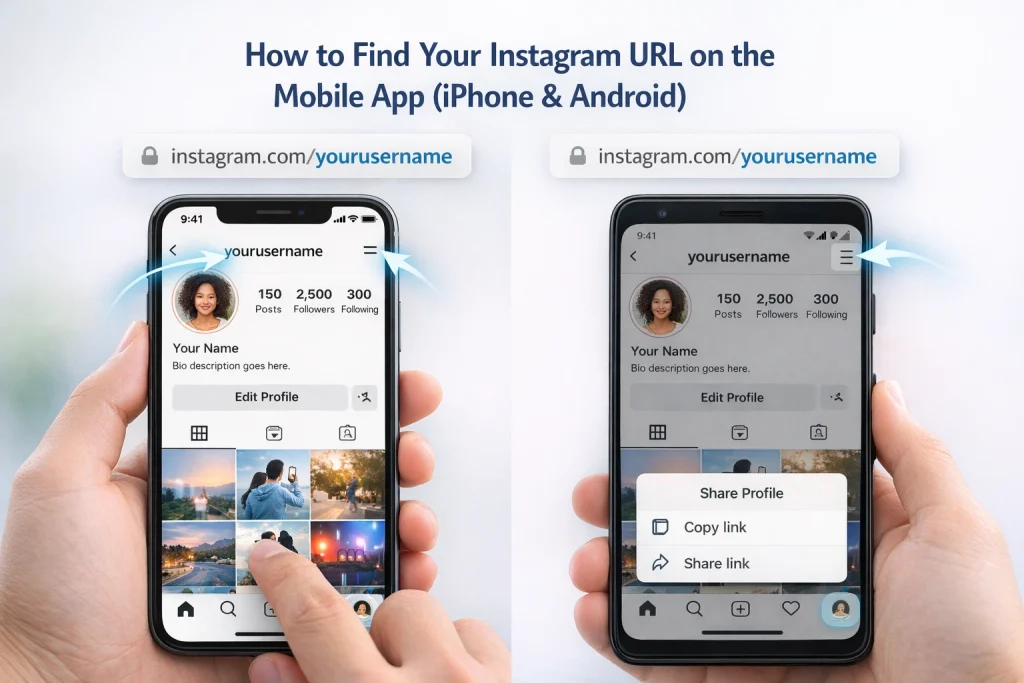
How to find your Instagram URL on the mobile app (iPhone & Android)
Finding your Instagram URL on mobile takes just a few steps and works the same on iPhone and Android.
-
Open the Instagram app and log in.
-
Tap your profile icon in the bottom-right corner.
-
Note your username at the top of your profile.
-
Your Instagram URL is
instagram.com/yourusername. -
To copy it directly, tap the menu icon (three lines) in the top-right corner and select Share Profile, then copy or share the link.
This method ensures you’re sharing the correct profile URL without typing it manually.
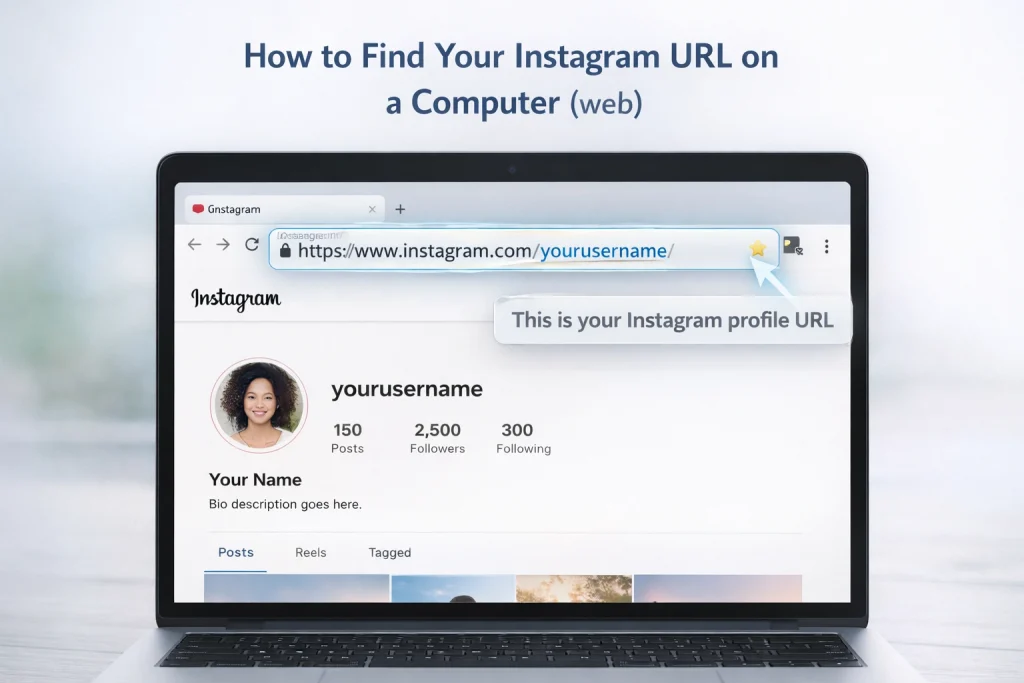
How to find your Instagram URL on a computer (web)
Finding your Instagram URL on a desktop browser is simple and takes only a few steps. Your Instagram profile link is essentially the web address displayed in your browser’s address bar when you visit your profile.
To locate it, start by logging into Instagram on any web browser, such as Chrome or Firefox. Once logged in, click on your profile picture or username in the top-right corner of the screen. This will take you directly to your profile page. The URL in the browser’s address bar is your Instagram profile link. It typically looks like this: `https://www.instagram.com/yourusername/`.
For example, if your username is `travelwithalex`, your Instagram URL will be `https://www.instagram.com/travelwithalex/`. Simply highlight the link in the address bar, right-click, and select “Copy” to save it to your clipboard. You can then paste it wherever you need, such as in an email signature, social media bio, or messaging app.
How Instagram Username Changes Affect Your URL
On Instagram, your username is the part of your profile that identifies you and forms the ending of your profile link. Because the Instagram URL always follows the format instagram.com/yourusername, changing your username automatically changes the web address people use to reach your profile. For example, if you change your username from janedoe to jane.writes, the correct profile link becomes https://instagram.com/jane.writes and the old URL will no longer direct visitors to your page.
If you’re planning a rebrand, understanding the steps involved in changing your Instagram name can help you avoid broken links and confusion across platforms. Instagram allows username changes directly in your profile settings. In some cases, particularly for accounts with a large following or high visibility, the platform may review the new username before fully applying it. This review process does not affect your ability to edit other parts of your profile, but it can delay when the updated URL becomes active.
Because of this connection between your username and your URL, any links you’ve already shared—on a website footer, in an email signature, or as part of marketing collateral—will stop working once the username changes. That’s an important consideration if you rely on a specific link for traffic or discovery. You should update any external references whenever you change your username to avoid broken links.
How to Find URLs for Posts, Reels & Stories
Instagram allows you to share direct links to individual posts and reels. To get the link, open the post or reel, tap the share icon, and select Copy Link. This copies a URL like instagram.com/p/xyz123 (for posts) or instagram.com/reel/xyz123 (for reels), which you can paste anywhere.
In a browser, just navigate to the content and copy the URL from the address bar.
Stories are different. They don’t have consistent shareable URLs unless saved as highlights. If you want to share a story with an external audience, use the Link Sticker to add an outbound link, or save the story to a highlight and share your profile URL instead. When you want viewers to visit an external page from a story, adding a link to your Instagram story is the most reliable way to guide them outside the app.
Where to Use Your Instagram URL
Your Instagram URL is a powerful way to help people find and follow your profile. Here are some of the most effective places to use it:
-
Your Website
Add it to your homepage, footer, or contact page so visitors can easily connect with you on Instagram. -
Email Signature
Include your URL in your email signature to promote your profile with every message you send. -
Social Media Bios
Link your Instagram profile from other platforms like X (formerly Twitter), YouTube, TikTok, Pinterest, or LinkedIn to cross-promote your content. -
Link-in-Bio Tools
Use services like Linktree, Beacons, or your own custom page to include your Instagram URL alongside your other important links. -
QR Code for Offline Sharing
Instagram offers a scannable QR code for your profile. You can print this on business cards, flyers, packaging, or event materials. -
Newsletters
Add your Instagram link at the end of your newsletters to give subscribers a way to follow your content elsewhere. -
Blog or Portfolio
Embed your Instagram profile or individual posts on your website to display content and drive traffic to your page.
Using your Instagram URL across both digital and offline spaces helps grow your reach and makes your profile easier to discover.
Frequently Asked Questions
My old Instagram URL doesn’t work. Did the account get deleted?
Possibly, but the most common reasons are: the username changed, the account was disabled/deleted, or you mistyped the handle. People frequently run into this when trying to find accounts by an old username.
Can I make an Instagram link that stays the same even if I change my username?
Not natively. Instagram profile URLs follow the username. If you need a stable link, use a redirect you control (your website page or a link-in-bio landing page) and update where it points when your username changes.
Can I embed my Instagram profile or posts on my website?
Yes, if the account is public. Instagram states that public profiles/posts/reels/guides can be embedded on websites/blogs/news articles.
Conclusion: What Is My Instagram URL?
Your Instagram URL is simply the direct link to your profile, and once you know how it’s formed, it’s easy to find, copy, and share. Since the link is tied to your username, understanding how changes affect your URL helps prevent broken or outdated links.
By using Instagram’s built-in sharing options and avoiding third-party tools, you can safely share your profile, posts, and reels wherever needed. With this knowledge, you can confidently share your Instagram presence across websites, messages, and offline materials without confusion.

Benjamin Amiri
Benjamin Amiri is a digital growth consultant and senior contributor at InstaDeal. He specializes in Instagram engagement strategies, Facebook ads innovation, and TikTok product marketing. With a track record of scaling brands and creator accounts, Benjamin turns performance data into actionable growth tactics that deliver measurable results.


