



Not knowing what is a carousel on Instagram can make your posts feel outdated or ineffective. With so many users leveraging this feature to boost engagement, missing out could mean fewer likes, shares, and followers.
In this article, you’ll learn exactly what a carousel is on Instagram, how it works, and why it’s a powerful tool for content creators, brands, and everyday users. Whether you’re new to Instagram or want to improve your posting strategy, understanding carousels is essential.
How we verified this: We referenced Instagram’s Help Center and publicly available documentation and reputable guides to explain what Instagram currently shows (and doesn’t show). Features can vary by app version and region, so if your menus look different, update the app and check Instagram’s settings/help pages.
Table of Contents
hide
Quick Summary
– Explain what a carousel on Instagram actually is
– Show how carousels differ from single-image posts
– Debunk common myths about carousel post performance
– Clarify how users can create and post a carousel
– Protect your engagement by using carousels effectively
What Is a Carousel on Instagram and How Does It Work?
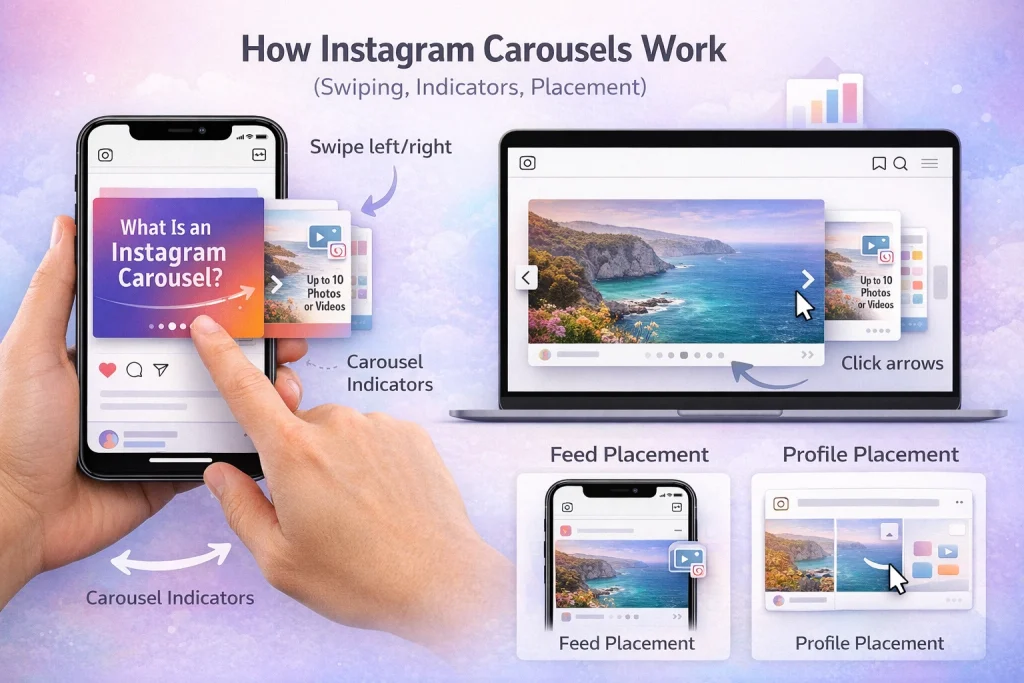
A carousel on Instagram is a post that allows users to share multiple photos or videos in a single post. This interactive format lets viewers swipe through up to 20 photos or videos (some accounts may still be limited to 10 due to gradual rollouts).
– A carousel can include up to 20 photos or videos, though some accounts may still see a 10-slide limit.
– Users swipe left or right to view the content.
– Supports creative storytelling and education.
– Allows brands and creators to showcase multiple aspects of a topic.
Carousels appear directly in the Instagram feed and on user profiles. In the feed, they’re marked with a small carousel icon in the top-right corner and a row of dots below the post, indicating multiple slides. These dots show how many images or videos are included and highlight the viewer’s current position within the carousel.
On mobile devices, users navigate carousels by swiping horizontally. Desktop users can click arrow buttons to move between slides, ensuring the format is accessible across platforms. This interactive design encourages longer viewing time and deeper engagement compared to single-image posts.
Because each slide can highlight a different aspect of a topic, carousels are especially effective for breaking down complex ideas or presenting multiple visuals in one cohesive post. For example, a business might use a carousel to show a product overview, key features, benefits, and customer testimonials—all within a single post.
Benefits of Instagram Carousels for Engagement and Visibility
Instagram carousels offer several advantages over single-image posts, making them a powerful format for creators, brands, and businesses looking to improve engagement and visibility.
1. Higher engagement rates
Carousels encourage users to swipe through multiple slides, increasing time spent on a post. More interaction—such as swipes, likes, comments, and saves—signals value to Instagram’s algorithm, which can lead to improved reach.
2. Better storytelling and education
Because a carousel supports up to 20 photos or videos (depending on account availability), it’s ideal for step-by-step tutorials, before-and-after examples, or layered storytelling. Each slide builds on the previous one, helping users understand a topic more clearly than a single image could.
3. More value in one post
Carousels allow you to pack multiple ideas, tips, or visuals into a single post without overwhelming viewers. For example, a marketer can share “5 Instagram growth tips” across five slides, delivering more value while keeping content digestible.
4. Increased saves and shares
Educational and informative carousel posts are more likely to be saved for later or shared with others. Saves and shares are strong engagement signals and can extend a post’s lifespan in the feed.
5. Multiple chances to capture attention
If a user scrolls past the first slide, Instagram may resurface the same carousel later showing a different slide first. This gives your content more than one opportunity to grab attention—something single-image posts don’t offer.
6. Versatility for different goals
Instagram carousels work well for many use cases, including product showcases, tutorials, list-style content, testimonials, and announcements. This flexibility makes them one of the most effective post types on Instagram.
Carousel Post vs Single Post vs Stories and Reels on Instagram
Unlike Stories, which vanish after 24 hours unless saved as highlights, carousels remain permanently visible on your profile. This permanence makes them a strategic choice for evergreen content, such as portfolio pieces or announcements you want to stay accessible. Stories, on the other hand, are better suited for time-sensitive updates or behind-the-scenes glimpses that create urgency.
Reels differ in that they focus exclusively on short-form video content, leveraging Instagram’s algorithm to reach wider audiences. While carousels allow a mix of photos and videos, Reels are designed for dynamic, engaging videos that often include trending audio or effects. For example, a fitness instructor might use a Reel to showcase a quick workout routine, while a carousel could display detailed steps with accompanying images or videos.
A common mistake is treating these formats interchangeably. Each serves a distinct purpose—carousels excel at depth, Stories at immediacy, and Reels at virality. To maximize engagement, align your content strategy with the strengths of each format. As a tip, consider repurposing a carousel into a series of Stories or a Reel to experiment with audience reach and interaction.
How to Make a Carousel on Instagram (Step-by-Step Guide)
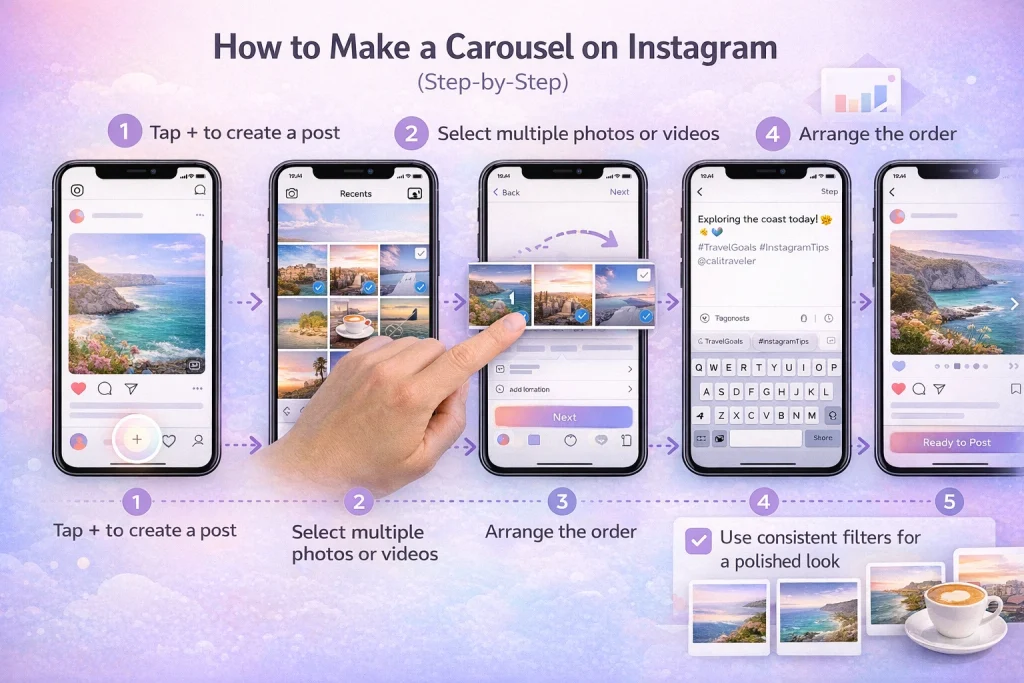
Creating a carousel on Instagram allows you to share multiple photos or videos in a single post, making content more engaging and versatile. Follow these steps to craft your own carousel post:
1. Open Instagram and start a new post : Launch the Instagram app and tap the “+” icon at the bottom of your screen to create a new post. This is your starting point for uploading content.
2. Select multiple photos or videos : Tap the “Select Multiple” option (indicated by overlapping squares). You can choose up to 20 images or videos, though some accounts may currently be limited to 10. For example, if you’re showcasing a product’s features, you might include photos of different angles and a video demonstration.
3. Arrange the order : Once selected, drag and drop the thumbnails to arrange them in the desired sequence. This ensures your story flows naturally. A common mistake is uploading out-of-order visuals, which can confuse viewers.
4. Add captions, tags, and hashtags : Customize each slide with relevant captions or tags. Include hashtags to boost discoverability. For instance, a travel blogger sharing a trip might tag locations and use trending hashtags like #TravelGoals.
5. Preview your carousel : Before posting, use Instagram’s preview feature to review your carousel. This step helps ensure the design and flow feel cohesive. Think of it as flipping through a photo album—everything should align visually and contextually.
Pro tip: Use consistent filters or color schemes across all slides to maintain a polished look. This creates a unified aesthetic that’s more appealing to your audience.
With these steps, you’ll create a carousel that not only tells a story but also captivates your followers.
Instagram Carousel Best Practices (Dimensions, Slides, Captions)
To get the most out of an Instagram carousel, it’s important to optimize both the visual structure and the messaging strategy behind each post.
Ideal carousel dimensions
For best results, use Instagram’s recommended post sizes to ensure your content displays correctly across devices. The most effective format is vertical (4:5) at 1080 × 1350 pixels, as it takes up more screen space in the feed. Square carousels (1080 × 1080) also work well, while landscape formats tend to perform lower due to reduced visibility.
Best-performing slide count
Although Instagram allows up to 20 slides, performance tends to depend more on content quality than slide count, data and creator insights consistently show that 3 to 7 slides perform best. This range provides enough depth to deliver value without causing swipe fatigue. Fewer slides may feel incomplete, while too many can reduce completion rates.
First-slide hook strategies
The first slide is the most important element of a carousel—it determines whether users swipe or scroll past. Use a strong hook such as:
-
A bold headline or promise (“5 mistakes hurting your Instagram reach”)
-
A curiosity-driven question
-
A visually striking image with minimal text
The goal is to immediately signal value and encourage interaction.
Effective carousel caption formulas
Captions should complement the slides, not repeat them. A proven structure is:
-
Hook line (reinforce the first slide’s promise)
-
Context or value explanation (why the carousel matters)
-
Call to action (e.g., “Swipe to see all,” “Save this for later,” or “Comment your thoughts”)
Well-optimized captions increase engagement, saves, and swipe-through rates—key signals that help carousel posts perform better in the Instagram feed.
Instagram Carousel Insights and Analytics: Limits and Performance Tips
Instagram Insights offers valuable data to evaluate carousel performance, including metrics like impressions, reach, and engagement rates. These analytics can help you understand how your audience interacts with your posts, making it easier to refine your content strategy. For example, you can track whether carousel posts generate higher engagement than single-image posts.
However, one major limitation is the lack of granular data for individual slides within a carousel. While you can see overall engagement for the post, Instagram Insights does not provide metrics for specific slides, such as which image or video received the most attention. This can make it challenging to pinpoint which content resonates most with your audience. Understanding how the Instagram algorithm resets and adapts can also explain why some carousel posts gain traction weeks after publishing.
To overcome this limitation, some marketers turn to third-party tools like Iconosquare or Later. These platforms can provide more detailed analytics, including insights into individual carousel frames. However, use these tools cautiously, as they may require access to your account data and could violate Instagram’s terms of service if not used properly.
Instagram Carousels and Account Ownership Considerations
Understanding how features like Instagram carousels affect engagement can be especially relevant when managing or transferring account ownership. Marketplaces such as InstaDeal, which focus on buying and selling Instagram accounts, often consider content performance formats when assessing account history and stability. Carousels can reflect how an account has been used to educate, promote, or engage an audience over time. This makes familiarity with carousel usage part of broader operational awareness when evaluating Instagram accounts.
Frequently Asked Questions About Instagram Carousels
Can each slide in an Instagram carousel have its own caption?
No. Instagram allows one caption per carousel post. However, you can tag people or products on individual slides within the carousel.
How many photos or videos can an Instagram carousel have?
Instagram carousels support up to 20 photos or videos, though some accounts may still be limited to 10 due to phased rollouts.
Can Instagram show a carousel starting on a different slide?
Yes, sometimes. Instagram may display a carousel starting on a later slide for certain users, but this behavior is not guaranteed and varies based on engagement and algorithmic testing.
Do third-party tools show detailed carousel slide analytics?
It depends. Many third-party tools are limited by Instagram’s API and may not support all carousel features (such as more than 10 slides). Claims of full per-slide metrics can be inconsistent, so tools should be evaluated carefully.

Benjamin Amiri
Benjamin Amiri is a digital growth consultant and senior contributor at InstaDeal. He specializes in Instagram engagement strategies, Facebook ads innovation, and TikTok product marketing. With a track record of scaling brands and creator accounts, Benjamin turns performance data into actionable growth tactics that deliver measurable results.


