



Thinking about quitting Instagram? You’re not alone. In 2025, more people than ever are either deleting their accounts for good or looking for ways to cash in by selling them safely. This guide walks you through both options step by step, so you can make the choice that actually fits your life.
Why People Delete Their Instagram Accounts in 2025
Most people who walk away from Instagram this year say the same thing: it just doesn’t feel worth it anymore. The app that once felt fun and social now comes with more noise than connection.
You open it to check on a friend, and within seconds you’re watching an ad, then a Reel from someone you’ve never heard of, then another ad. By the time you find the post you actually wanted to see, you’ve already burned ten minutes. That kind of experience wears people down.
There are other reasons too:
-
Privacy. Instagram tracks nearly everything you do. Some folks are no longer okay with handing over that much data for free.
-
Mental health. It’s hard not to compare yourself when your feed is filled with flawless vacations, fitness influencers, or people who seem to always be winning. Many users notice they feel worse after scrolling, so they delete the account and don’t look back (Source:psychologytoday)
-
Creators and small businesses. For years, Instagram was a goldmine for growth. Now, many complain their posts barely reach anyone unless they pay to boost. If your livelihood depends on attention, that shift can be brutal.
-
Fresh starts. Sometimes it’s personal. A breakup, a job change, moving cities—deleting an old account feels like shedding skin.
Some users don’t just deactivate — they want their account erased completely. If you’ve ever wondered how it appears from the outside, I’ve broken that down in detail here: what happens when someone deletes Instagram.
How to Permanently Delete Your Instagram Account
You can delete your account in the Instagram app. Go to Profile → ☰ → Accounts Center → Personal details → Account ownership and control → Deactivation or deletion → [pick your account] → Delete account, then confirm with your password. Your profile is hidden right away, reversible for 30 days, and fully purged within up to 90 days.
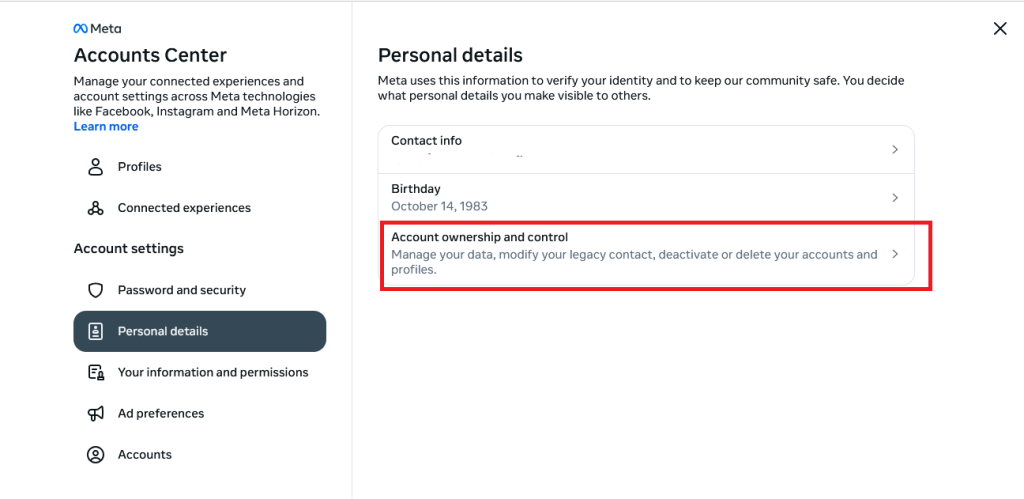
Step-by-step:
-
Open Instagram → your profile. Tap your profile photo (bottom right).
-
Tap ☰ (top right) to open the menu.
-
Accounts Center. Choose Accounts Center.
-
Personal details under Account settings.
-
Account ownership and control.
-
Deactivation or deletion.
-
Select the right account if you manage more than one.
-
Delete account (not just “Deactivate”).
-
Continue and follow the prompts.
-
Pick a reason (any reason works).
-
Confirm with your password, then tap Delete account.
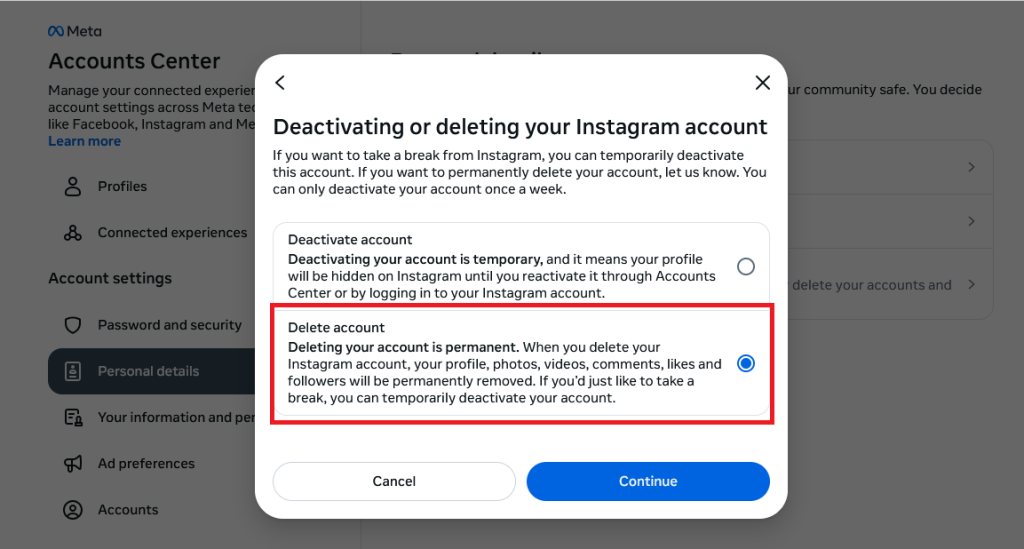
What to know before you hit delete:
-
Reversal window: You’ve got 30 days to change your mind—just log back in and the deletion cancels.
-
Permanent removal timeline: Technically, full removal of your data can take up to 90 days, even though your account disappears from view right away (Source:Instagram)
-
Save your stuff first: If you want old photos, Reels, or DMs, request a data download in Settings before deleting.
-
Handles aren’t guaranteed: Your username may or may not become available again later.
-
Security reality: Instagram won’t delete it for you—you must be able to log in and request deletion yourself.
Quick tip from the trenches:
If you manage a business or creator profile, screenshot key settings (bio, links, highlights covers) or export anything you may want to reuse on other platforms. It’s faster than rebuilding from memory.
How to Temporarily Deactivate Your Instagram Account
Sometimes you don’t actually want to erase your account — you just want it out of sight for a while. That’s what deactivation is for. Think of it as putting your Instagram on pause. Nobody can see your profile or posts while it’s off, but everything is still there waiting if you decide to come back.
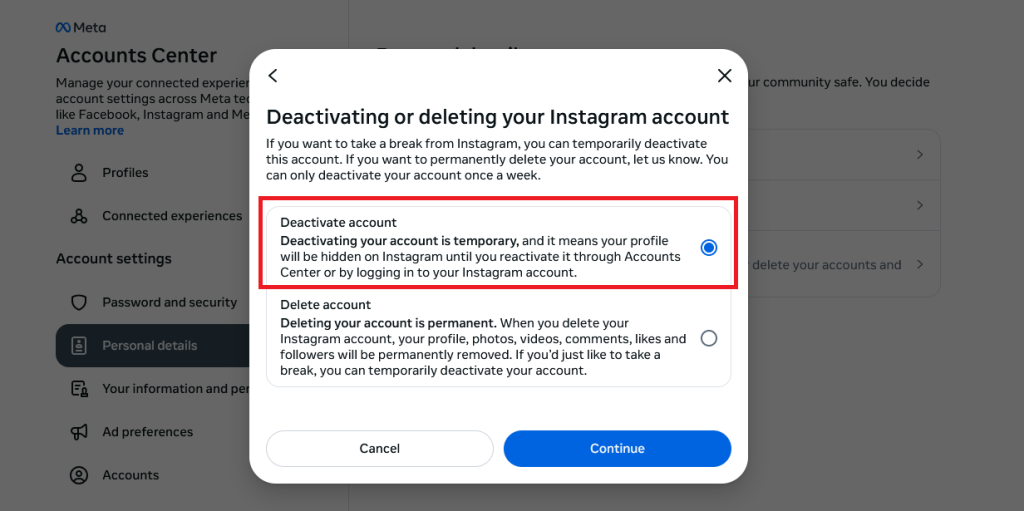
The option is tucked away in the Accounts Center, not on the main profile page, so here’s where you’ll find it:
- Open Instagram and go to your profile.
- Tap the three lines in the top right corner.
- Go into Accounts Center.
- Under Personal details, select Account ownership and control.
- Tap Deactivation or deletion.
- Choose your account, then select Deactivate.
- Enter your password to confirm.
Once you do this, people won’t see your photos, likes, or comments, and your profile link will stop working. The difference from deletion is that you can stay deactivated for a week or a year, and when you log back in, it all comes back exactly how you left it.
Why choose this over deleting? Here are the usual reasons:
- You need a mental break but don’t want to lose your photos or messages.
- You’re not sure yet if you really want to leave Instagram for good.
- You’re busy with exams, a new job, or personal stuff and want fewer distractions.
One detail worth knowing: if you’ve sent someone a direct message before deactivating, they may still see that conversation in their inbox. It only hides your account, not the messages already out there.
What Happens After You Delete Your Instagram Account?
Hitting “delete” feels final, and in many ways, it is. Still, a lot of people aren’t clear on exactly what happens once you go through with it. Here’s what you can expect:
-
Your profile disappears right away. As soon as you confirm deletion, your username, posts, and comments vanish from public view. To your followers, it looks like you no longer exist on the platform.
-
There’s a 30-day grace period. Instagram holds your account in the background for about a month. If you change your mind during that time, all you have to do is log back in, and the deletion process is canceled.
-
Full removal takes up to 90 days. While you’re invisible to other users almost immediately, Instagram’s systems can take a few months to completely clear your photos, videos, and data from their servers.
-
Shared messages may stick around. If you’ve had private chats, those conversations may still be visible to the other person even after your account is gone. Instagram does this to preserve the flow of the chat history.
-
Your username might free up… eventually. After deletion, there’s no guarantee that your old handle will become available again. Sometimes it does, sometimes it doesn’t. If you’re attached to your username, keep that in mind.
Should You Sell Your Instagram Account Instead of Deleting It?
Before you pull the plug, it’s worth asking yourself if the account has value beyond your own use. In 2025, Instagram accounts — especially ones with real followers or rare usernames — are sometimes treated like digital real estate.
Why do people sell instead of delete?
-
Cash on the table. A page with even a few thousand loyal followers can attract buyers. Small brands or influencers often prefer taking over an active account rather than starting from zero.
-
All that work. If you’ve been posting for years, deleting might feel like throwing away your time. Selling is one way to pass it on instead of erasing it.
-
The username itself. Clean handles (short names, city names, niche words) can sometimes be valuable all on their own.
But here’s the flip side:
-
It’s risky. Instagram doesn’t officially support account sales, so scams are common. Once you hand over the login, you’re at the mercy of the buyer.
-
Against the rules. Technically, selling breaks Instagram’s Terms of Service. If they catch on, the account could be shut down.
-
You lose control. Your old photos, comments, and history are suddenly in someone else’s hands. That can feel strange, especially if it was once a personal account.
For accounts with strong engagement, selling can be more rewarding than wiping everything clean. I’ve put together a complete guide on how to sell an Instagram account.
FAQs (Real Questions People Ask):
1. Can messages I sent remain after I delete my account?
Totally. Even if you delete your account, messages you sent will still show up to the other person—and they’ll appear as coming from “Instagram User” because your profile is gone.
2. Is what I delete immediately gone on Instagram’s side?
Not really. Instagram hides your profile and content instantly—but your data might actually stick around on their servers for up to 90 days before it’s fully purged.
3. What if I uninstall the app—does that delete my account?
No. Removing the app from your phone doesn’t touch your account.
4. Can I delete my Instagram without logging in or remembering the password?
Unfortunately, no. You must log into the account and enter the password to delete it
5. If I delete Instagram, what happens to my Threads account (or anything else linked)?
Deleting your Instagram can also affect linked Meta products. For instance, deleting Instagram might nuke your Threads account too.

Benjamin Amiri
Benjamin Amiri is a digital growth consultant and senior contributor at InstaDeal. He specializes in Instagram engagement strategies, Facebook ads innovation, and TikTok product marketing. With a track record of scaling brands and creator accounts, Benjamin turns performance data into actionable growth tactics that deliver measurable results.


