

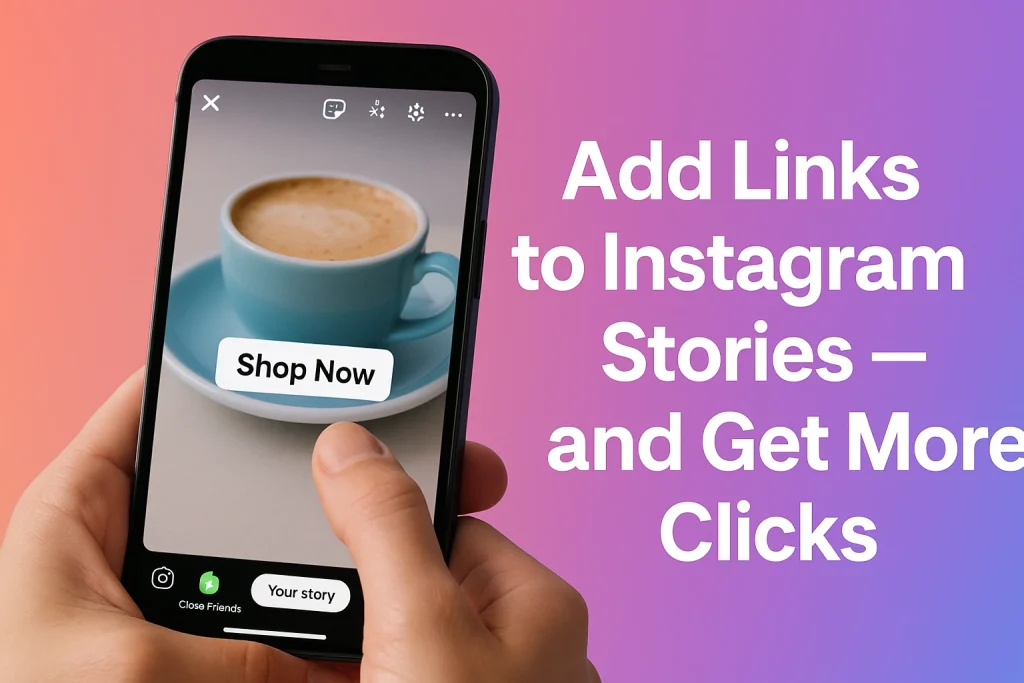

If you’ve been on Instagram for a while, you probably remember the days of “swipe up.” Back then, only accounts with over 10,000 followers could add links to stories — which meant smaller creators and growing brands were stuck saying “link in bio” over and over.
Now, anyone can add a clickable link sticker to their Instagram Story, no follower threshold required. (Instagram’s announcement on link stickers) Stories are where attention lives on Instagram. They’re quick, casual, and personal — the perfect format for micro-moments that spark action. Whether you’re showing a behind-the-scenes clip or teasing a product drop, a link sticker turns that moment into a direct line to your site, shop, or landing page.
Step-by-Step Guide: How to Add a Link to Your Instagram Story
Step 1: Open your Instagram Story creator
The fastest is to swipe right from your home feed. Or, tap and hold your profile picture, then hit Add to story.
Step 2: Pick your photo or video
Snap something on the spot, or swipe up to choose from your gallery.
Step 3: Tap the sticker icon
Look at the top of your screen — the smiley-square icon with a folded corner. Tap it. You’ll see a bunch of sticker options pop up.
Step 4: Choose the ‘LINK’ sticker
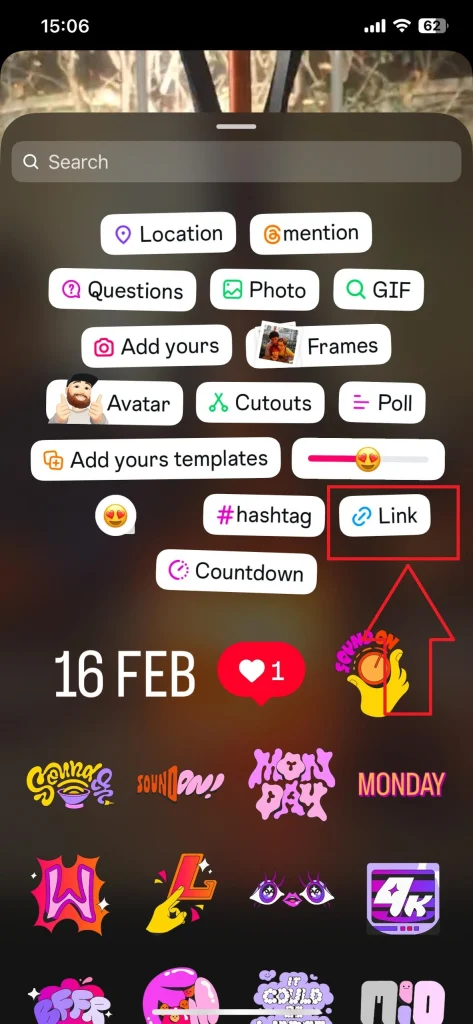
You’ll spot it with the chain link icon. If it’s not there, type “link” in the search bar. Once it appears, tap it and paste your URL.
Step 5: Customize your text
Under the URL box, you’ll see Customize sticker text. Use it. Swap a plain domain for a call to action like “Shop now,” “Read more,” or “Get the deal.” Those tiny tweaks actually boost clicks.
Step 6: Place and style it
After hitting Done, drag your link sticker wherever it fits best. Make sure it’s visible but not covering anything important. You can tap to switch colors, resize it with two fingers, or layer it over your design.
Want another walkthrough, with alternate visuals and tips? Check out the step-by-step link sticker guide by Hootsuite.
Creative Ways to Add a Link to Instagram Story for Higher Engagement
Once you know how to add a link, the real question becomes: what should you actually link to? Let’s run through a few smart ways to use it.
1. Launch something new — but make it feel personal.
Say you’re dropping a new product or service. Instead of a static “New item!” post, film a quick behind-the-scenes clip — maybe your team unpacking it, or you testing it out. Then drop the link sticker with something friendly like “See it in action.” That mix of casual + clickable works surprisingly well.
2. Use stories to extend your content.
Wrote a blog? Published a YouTube video? Share a teaser on your story and link to the full piece. Keep it short, like “The full video’s wild — watch here.” You’re not begging for clicks; you’re inviting curiosity.
3. Drive limited time offers or urgency.
Stories disappear after 24 hours, which makes them perfect for flash sales, early-bird deals, or “last chance” promos. Add a countdown sticker next to your link, and you’ve got built-in urgency.
4. Create a mini sales funnel — story by story.
Smart brands don’t dump everything in one post. They use three or four connected stories: one to hook attention, one to show value, and one with the link. That structure feels like storytelling, not advertising — and people follow stories.
5. Collaborate or cross-promote.
If you’re partnering with another brand or creator, trade shoutouts using each other’s links. It feels authentic and helps both audiences discover something new.
Once you’ve mastered adding a link sticker, learning how to repost an Instagram Story can help you share content from customers or partners and amplify your reach.
Pro Tips to Make Your Instagram Story Link Stickers Get More Clicks
The difference between a story that gets ignored and one that drives traffic usually comes down to a few small (but crucial) tweaks.
1. Lead with a reason, not a link.
Most viewers don’t tap just because a link exists — they tap because they’re curious. Give them a reason first. Tease the benefit before you reveal the link. For example: “I found something that literally cut my editing time in half 👇” — then add your sticker. The story builds intrigue before asking for action.
2. Match your sticker design to your story.
If the sticker blends into the background, people miss it. If it clashes, it feels spammy. The sweet spot? Subtle contrast. Use colors that pop just enough without screaming for attention.
3. Make your CTA sound human.
Forget robotic text like “Click here.” Use something that feels conversational: “Check it out,” “Shop the look,” “See how it works.” When your words sound like you, followers respond better.
4. Don’t overload the screen.
Your story shouldn’t look like a sticker explosion. Too many elements and people’s eyes don’t know where to go. Keep it clean — one message, one CTA, one clear link.
5. Timing matters.
Place your link where viewers naturally pause — right after a punchline, a reveal, or a visual payoff. If you’re talking to the camera, pause a second before the sticker appears. That micro-delay often means the difference between a scroll and a tap.
6. Test and tweak.
If you’re running multiple stories, change your link text or placement slightly each time. See which one gets more taps. It’s small-scale A/B testing — simple, but super effective.
Common Mistakes to Avoid When You Add a Link to Your Instagram Story
Every marketer (and creator) has done at least one of these. You post a great story, drop your link sticker, hit publish… and the next day, zero clicks. It happens. Usually, it’s not the content — it’s one of a few easy-to-miss mistakes.
1. Burying the sticker under your visuals.
It’s surprisingly easy to cover your link with text, emojis, or a sticker that feels “aesthetic.” But if people can’t see it, they can’t tap it. Keep your link clear of edges, captions, or reaction bars.
2. Using vague CTAs.
“Check this out” doesn’t really tell anyone what they’re clicking for. Be direct. Use a phrase that sets expectations: “Grab the discount,” “See the full recipe,” “Get the guide.” People click when they know what they’re getting.
3. Making it look too salesy.
If your story screams “ad,” viewers swipe away before the link even loads. Blend the CTA into your narrative. Show value first, then drop the link naturally — like a friend recommending something, not a brand pushing a sale.
4. Forgetting mobile readability.
Most people are watching stories one-handed, on a tiny screen. If your text is too small or your sticker color blends into the background, they’ll never even notice it.
5. Ignoring analytics.
It’s easy to post, move on, and never check what worked. But your data tells a story. See which sticker placement or design drove the most taps. You’ll start spotting patterns fast.
How to Track Instagram Story Link Performance (Without Losing Your Mind)
Check your story insights.
After your story goes live, tap it and swipe up to see insights. You’ll find a few metrics that matter — link clicks, forwards, exits, and replies. Out of all those, link clicks are your main focus. That’s your direct signal that people didn’t just watch — they acted.
Notice what was happening when people tapped.
Did you show a product? Ask a question? Tell a story? Those small context clues reveal why the link worked. Screenshot your analytics after each post so you can start spotting patterns over time.
Use tracking tools — but don’t overcomplicate it.
If you’re sharing multiple links (say, blog posts or shop pages), use UTM parameters or short links to see which story drove what. Tools like Google Analytics or built-in Instagram insights will show where traffic came from.
Pay attention to the “feel” behind the metrics.
If a story had lower link clicks but more replies, it might’ve sparked conversation — which isn’t a bad thing. Sometimes engagement > conversion, depending on your goal.
And finally, don’t obsess.
Not every story will perform the same, and that’s okay. The best creators treat analytics like feedback, not judgment. Test, learn, adjust — that’s the real game.
FAQs: Everything About Adding Links to Instagram Stories
1) Can I add more than one link sticker in a single Instagram Story?
Short answer: no. Instagram currently supports one link sticker per Story.
2) Are links clickable in Instagram Reels?
Not inside the Reel itself. Reels don’t support clickable links on-screen; use Stories for link stickers, or drive people to your bio links.
3) Who can add link stickers—do I still need 10k followers?
Everyone. Instagram opened link stickers to all accounts.
4) Why don’t I see the link sticker in my Story tools?
update the app, switch to a Professional account (for broader Insights), and make sure your account is in good standing.
5) Can I use link stickers in Story ads?
Link stickers are for organic Stories. Story ads use Meta’s built-in call-to-action instead.

Benjamin Amiri
Benjamin Amiri is a digital growth consultant and senior contributor at InstaDeal. He specializes in Instagram engagement strategies, Facebook ads innovation, and TikTok product marketing. With a track record of scaling brands and creator accounts, Benjamin turns performance data into actionable growth tactics that deliver measurable results.


