


How to add link to Instagram post is a question that hits when you feel pressure to drive clicks, sales, or sign-ups—and Instagram won’t let you drop a clickable URL in a standard feed caption. That frustration can make you look unprepared when others seem to send followers to a page instantly.
You’ll learn the real options Instagram provides to add a link to an Instagram post, what’s possible in captions versus other placements, and the exact steps to use the available link features correctly. You’ll also learn how to avoid common mistakes that make links unclickable or hard to find.
Can You Add a Clickable Link to an Instagram Post?
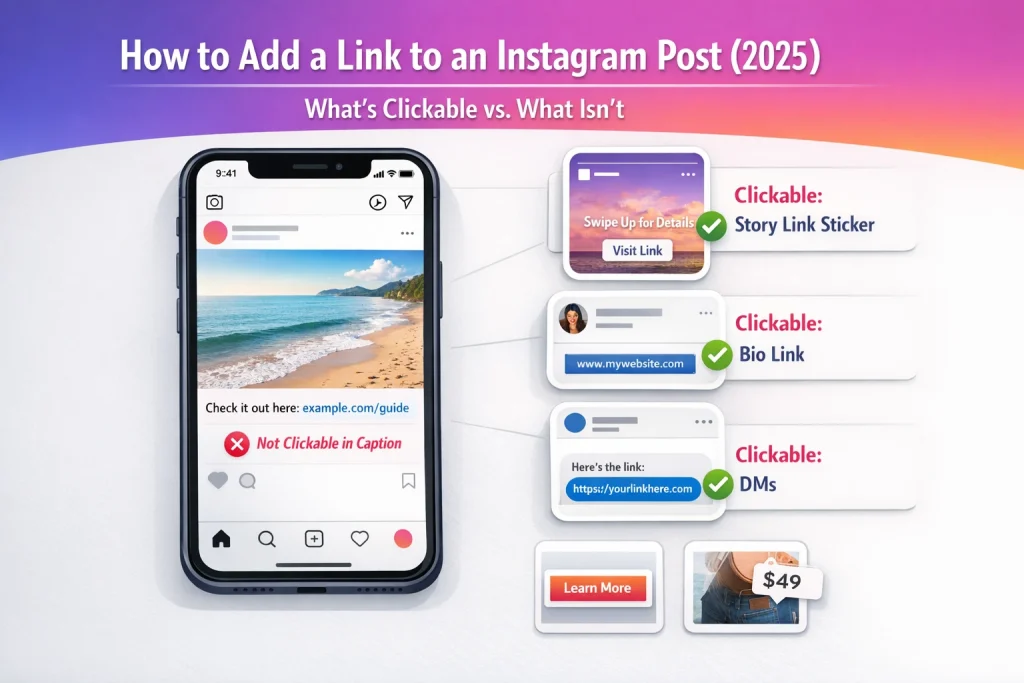
No—Instagram feed post captions (and Reel captions) still don’t support clickable links in 2026. If you paste a URL in the caption, it shows up as plain text, so people can’t tap it. Same deal in comments (even pinned comments): the URL won’t become a tappable link.
What’s possible vs. not possible
Possible: you can mention a URL in a caption to tell people where to go.
Not possible: you can’t turn that pasted URL into a tap-to-open link inside the caption or comments.
A practical workaround that actually works: write a short “go to link in bio” line, and use a memorable slug (e.g., “example.com/ig”) so people can type it if they don’t want to leave the app.
| Method | Clickable | Best For | Duration |
|---|---|---|---|
| Caption | ❌ | Awareness | Permanent |
| Bio Link | ✅ | Evergreen traffic | Permanent |
| Story Sticker | ✅ | Time-sensitive | 24h / Highlight |
| DMs | ✅ | High-intent leads | Manual |
| Ads | ✅ | Scalable traffic | Paid |
Where Instagram Allows Clickable Links (Bio, Stories, DMs & Ads in 2026)
Clickable link “surfaces” are the places Instagram expects links to live:
-
Your bio link(s) (via the Links field in your profile)
-
Stories link sticker (then save the Story to a Highlight if you want it to stay visible)
-
DMs (sending a link directly to someone)
-
Ads with CTA buttons
Also, shopping/product tags can take people to product pages—but that’s different from making a pasted caption URL clickable.
How to Add a Link to an Instagram Post (Step-by-Step)
If you paste a URL into an Instagram post caption, it will show up as plain text—not a clickable link. People can still copy it, but most won’t, so expect low traffic. (Later sections cover better workarounds like your bio link, Stories, DMs, and ads.)
Step-by-step on mobile (iPhone/Android)
-
Start a new post or Reel (the exact screens can vary by app version).
-
When you reach the caption field, paste or type your full URL.
-
Publish.
What users will see: the URL appears in the caption as text. On most accounts, it won’t be tappable, so viewers would need to long-press, copy, then switch apps to open it.
Step-by-step on desktop (Instagram.com)
-
Create a new post on Instagram.com.
-
Paste the URL into the caption field.
-
Publish.
Same outcome: the URL typically remains plain text in the caption rather than becoming a clickable hyperlink.
How to format the URL so it’s easy to copy
-
Put the URL on its own line (less chance it gets “stuck” to nearby text).
-
Avoid trailing punctuation like a period or comma (people copy it by accident and the link breaks).
-
Skip extra parentheses.
-
Keep it short and readable (ideally a clean domain + path, like example.com/offer).
Privacy/visibility note: public vs. private accounts
If your account is private, only approved followers can see your post and the URL text in the caption. Non-followers won’t see it to copy. If you later switch to public, that post becomes broadly visible again unless you delete it or restrict visibility in another way.
Best Workarounds (Bio, Stories, DMs, Ads)
If you want one link that works from any feed post or Reel, the bio link area is the most reliable workaround. People can tap your profile from anywhere, and the link(s) in your profile stay clickable no matter which post sent them there.
Single link vs. link hub (multiple links)
Single link is the simplest: you swap your bio link whenever you run a new promo. It’s fast, but it’s also easy to forget—then older posts keep sending people to something irrelevant (or worse, a dead page).
Link hub is the “set it and forget it” option: use one stable landing page (often on your own site) that lists multiple destinations (freebie, booking, shop, newsletter). That way, old posts don’t break just because you changed what you’re promoting this week. Experience-wise, this is the difference between constantly “patching holes” and having one doorway that always leads somewhere useful.
Step-by-step: change your bio link
The exact labels can vary by app version, but the common path is:
-
Profile → Edit profile
-
Links (or Add links)
-
Add external link
-
Paste your URL → Save
-
Practical tip: tap the link yourself right after saving to confirm it opens correctly (and loads well on mobile).
How to reference it in captions without sounding spammy
A common mistake is writing a vague “link in bio” and hoping people hunt for it. That usually underperforms. Instead, tell them exactly what they’ll see after tapping—and keep the destination consistent with the post’s promise.
Trust-building CTA examples:
-
“Details + signup at the link in my bio (top option: ‘Free checklist’).”
-
“Tap my profile, then ‘Book a consult’.”
When to use Highlights to keep the link visible
If you also share the link via a Story link sticker, save that Story to a Highlight (e.g., “Menu,” “Book,” “Sale”) so the clickable link stays accessible after the Story would normally disappear.
Use the Instagram Stories link sticker for a truly clickable link
If you want a link people can actually tap (without ads), the Stories link sticker is the most straightforward option. It turns your URL into a tappable element right on the Story—so viewers don’t have to hunt for your bio link. If you want a more detailed guide to adding links to Instagram Stories with screenshots and variations, this walkthrough explains each step clearly.
Step-by-step: add the link sticker
-
Create a Story (photo, video, or text).
-
Tap the sticker icon.
-
Choose Link.
-
Paste your URL.
-
Edit the sticker text so it’s clear what happens next.
-
Place the sticker where it’s easy to tap.
-
Publish.
It also helps to understand the current Instagram video length limits so your linked Story or Reel delivers the full message before viewers tap away.
How to customize sticker text for higher taps
The common misconception is that “Link” is enough. In practice, specific CTAs win because they reduce uncertainty. Examples that tend to outperform generic text:
-
“Get the menu”
-
“Download the guide”
-
“Book a slot”
Also optimize placement and readability: keep it away from areas that can be covered by the reply field or top UI elements (like your username), and use high-contrast colors behind/around the sticker so it doesn’t blend into the background.
Save to Highlights so the link lasts longer
Stories expire after 24 hours, so your clickable link disappears with them unless you add that Story to a Highlight. If this link is evergreen (pricing page, lead magnet, booking page), save it into a clearly named Highlight so it stays accessible from your profile.
Privacy/visibility: who can see and tap your Story link
Visibility follows your Story settings. Private accounts limit views (and taps) to approved followers. “Close Friends” narrows it further. Public accounts can reach anyone who can view your Story—if someone can’t see the Story, they can’t tap the link.
Troubleshooting: can’t find the link sticker or link won’t open
Missing sticker or inconsistent behavior is common. Try: update Instagram, force-close/reopen, log out/in, and test on another device. Check Account Status for restrictions—some features roll out gradually or may be limited after policy strikes. If the link won’t open, test the URL in a browser first, then try removing tracking parameters temporarily to isolate the issue. Basic safety: link to pages you control or trust, avoid deceptive redirects, and don’t send people to unfamiliar pages asking for passwords.
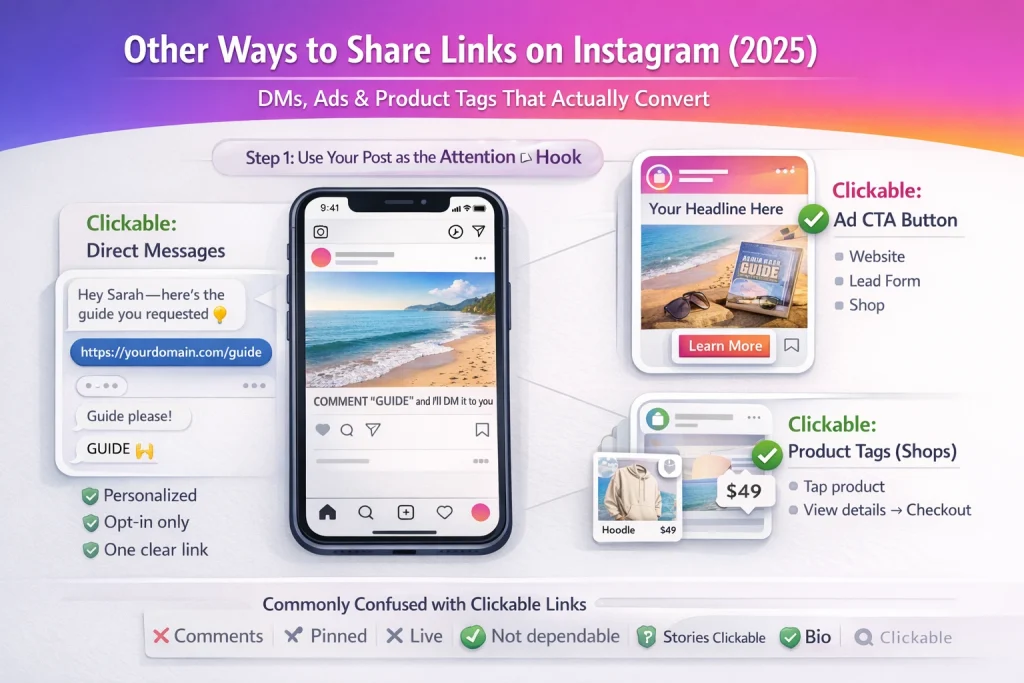
If you’re trying to solve “how to add link to Instagram post,” the workaround is usually: move the click to a surface Instagram does treat like a link—DMs, ads, Stories, or product tags—then use your feed post as the “attention hook.”
Send a clickable link in DMs (manual + compliant automation)
Links you send in Direct Messages are clickable, which makes DMs the cleanest way to deliver a URL without asking people to copy/paste.
A practical workflow that converts well:
-
Post a Reel/carousel and say: “COMMENT ‘GUIDE’ and I’ll DM it to you.”
-
Manually DM the link to each commenter (or use an approved, policy-compliant automation tool that sends DMs only after someone opts in).
DM safety/quality tips that keep you out of the “spammy” zone:
-
Don’t blast unsolicited links to people who didn’t ask.
-
Personalize the first line (even just “Hey Sarah—here’s the guide you requested”).
-
Send one clear URL (not three options).
-
Set expectations: “This goes to a signup page / checkout / PDF download.”
Common mistake: auto-DM’ing everyone who interacts with a post. That’s how you get muted fast.
If you need a guaranteed clickable path from a post-style creative, ads are the straightforward option. In Meta Ads Manager, you choose an objective, pick a destination (website, Shop, or a lead form), add your URL, then publish.
Practical tip: add UTM parameters and test the landing page on mobile before spending—small layout issues can crush results.
If your account is eligible for shopping features, product tags let people tap from your content to a product detail page (and sometimes checkout). This isn’t the same as adding a custom URL to a caption—but it is a clickable commerce path.
Experience-based insight: product tags tend to work best when the product is visually obvious (people tap what they can instantly identify).
Related features people confuse with links (comments, pinned comments, Live, Stories)
-
Comments/pinned comments: you can paste a URL, but it’s not reliably tappable—people still have to copy it.
-
Live comments: also not a dependable “click” surface.
-
Stories: this is where clickable links are built-in via the link sticker.
-
Bio link: still the main clickable destination you can point to from feed captions.
Get more clicks (UTMs, short links, CTAs) — and avoid third-party ‘caption link’ scams
Use UTMs to track what’s working
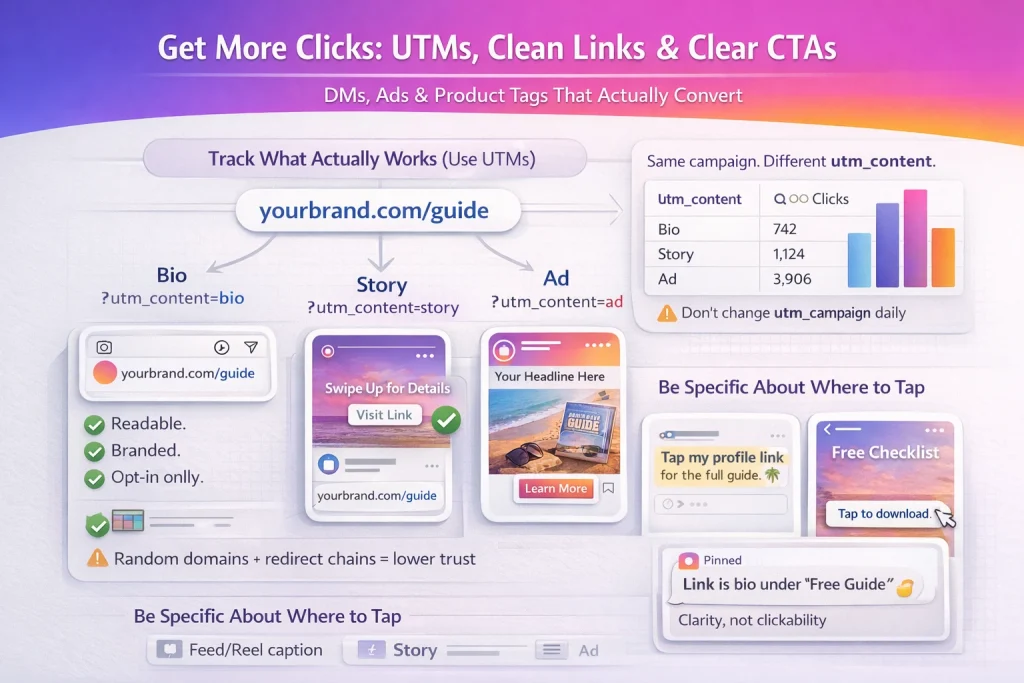
If you’re sending people “to the link in bio,” you’ll want to know which Instagram surface did the work: bio vs. Story vs. ad. The simplest way is UTM parameters.
Practical setup: create a separate URL for each placement.
-
Bio:
?utm_source=instagram&utm_medium=social&utm_campaign=spring_launch&utm_content=bio -
Story: same, but
utm_content=story -
Ad: same, but
utm_medium=paid_social&utm_content=ad
That way, your analytics can separate traffic cleanly by placement instead of lumping everything into “Instagram.” One common mistake: changing the campaign name every day. Keep utm_campaign stable for the launch, and vary only utm_content.
Tracking traffic properly becomes even more important once you understand how creators actually earn money on Instagram and start optimizing for revenue instead of just clicks.
Short links and readable URLs (without looking shady)
Short links can boost clicks because they’re easier to trust at a glance—if they look legit. Best option: use your own domain (e.g., yourbrand.com/guide). If you can’t, use a reputable shortener.
Avoid chains of redirects and random-looking domains. In real use, people hesitate when they see a weird URL, and some browsers throw warnings—both kill conversions.
CTA and placement ideas for posts, Reels, and Stories
Be painfully specific about where to tap:
-
Feed/Reels caption: “Tap my profile link” or “Check the ‘Sale’ Highlight.”
-
Reels: add on-screen text that points to the bio/Highlight (quick, readable, and repeated near the hook).
-
Stories: pair the link sticker with a clear headline + one action (example: “Free checklist → Tap to download”).
Tip: use pinned comments for clarity (not clickability). Pin: “Link is in bio under ‘Free Guide’” to stop the ‘where’s the link?’ thread.
Third-party ‘add link to caption’ tools: what to avoid
Apps/extensions promising “clickable caption links” are a common scam vector. Risks include phishing (fake login pages), malware, unauthorized automation, and account compromise—plus potential policy violations that can lead to reduced reach or missing features.
Security basics: enable 2FA, use a strong unique password, review your Login Activity regularly, and always double-check the destination domain before you share—especially if someone else handed you the link.
If you’re wondering how to add a link to an Instagram post in 2026, the answer hasn’t changed: captions aren’t clickable. But once you use the right link surface—bio, Stories, DMs, or ads—you can drive consistent traffic without fighting the platform.
The key is clarity and consistency. Tell people exactly where to tap, make sure the destination matches the promise of your post, and test everything on mobile before you publish. Once you shift from “trying to make captions clickable” to “choosing the right click surface,” driving traffic from Instagram becomes much simpler—and much more effective.
FAQ
Are links clickable in Instagram comments (or pinned comments)?
No—comment URLs are not reliably clickable (most of the time they’re plain text), even if pinned. Treat pinned comments as instructions, not a click destination.
Does having a Business/Creator account, verification, or more followers unlock clickable caption links?
No. Account type and follower count do not make caption links clickable. Instagram keeps clickable links to specific “surfaces” (bio, Stories, etc.).
How do creators auto-DM me a link when I comment a keyword? Is that legit?
Yes—this “comment keyword → DM link” pattern is widely used via automation tools, but users also complain about spammy implementations. Best practice: only DM after an explicit keyword opt-in, keep it to one link, and clearly state what it is.

Alex Morris
Alex Morris is a social media strategist and lead writer at InstaDeal. He specializes in Instagram, TikTok, and creator monetization trends, helping influencers and brands grow smarter online. With over 10 years of digital marketing experience, he simplifies complex topics into practical insights.


