


Not being able to access your Instagram can feel like being cut off from your social world. If you’re wondering how to reactivate Instagram account access after deactivation or a temporary suspension, you’re not alone—and the process isn’t always straightforward.
This guide will walk you through every step needed to restore your Instagram account. Whether you deactivated it yourself or it was disabled by Instagram, you’ll learn the exact actions to take to get back online.
Quick Answer: How to Reactivate Your Instagram Account
If you temporarily deactivated your Instagram account, you can reactivate it simply by logging back in.
Here’s how to reactivate your Instagram account:
-
Open the Instagram app or go to instagram.com.
-
Enter your username, email, or phone number.
-
Enter your password.
-
Tap Log In.
If your account was only temporarily deactivated, it will be restored immediately after successful login. Your profile, followers, posts, and messages will reappear as they were before deactivation.
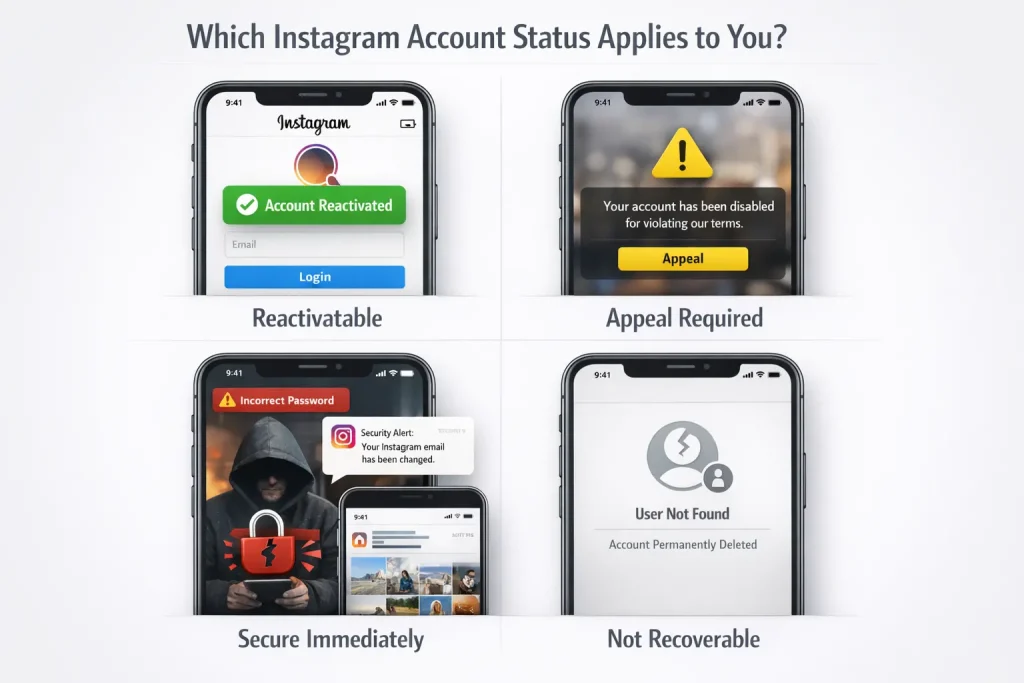
Choose Your Situation (Deactivated vs Disabled vs Hacked vs Deleted)
Before taking further action, identify your account’s exact status. The recovery path depends entirely on what happened to the account.
Temporarily Deactivated (You Did It)
If you chose the “Temporarily deactivate my account” option in settings, your profile becomes invisible to others, but your data remains stored. This status is reversible and does not involve policy review.
Clue: No violation message appears — only normal login prompts. If you plan to take a break again later, here’s how to properly deactivate your Instagram account without triggering unnecessary confusion.
Disabled or Suspended by Instagram
If Instagram disabled your account, you will typically see a notice stating that your account was disabled for violating Community Guidelines or Terms of Use.
Common triggers include:
-
Repeated guideline violations
-
Spam-like behavior (mass follows/unfollows)
-
Automation tools
-
Impersonation or copyright complaints
Disabled accounts require review and cannot be restored through standard login. Review this breakdown of how enforcement actions typically work to better understand the difference between temporary and permanent Instagram bans.
Hacked or Compromised
If your credentials were changed without your permission, your account may still exist but be inaccessible.
Indicators include:
-
Password reset emails you didn’t request
-
Changed email address
-
Suspicious login alerts
-
Posts or messages you didn’t create
This situation requires security recovery, not reactivation. If you’re unsure how the breach happened, this guide explains how Instagram accounts get hacked and what vulnerabilities are most common.
Deletion Requested (Within Pending Period)
If you initiated permanent deletion, Instagram enters a pending deletion phase. During this window, the account may not be searchable, but deletion is not yet finalized.
Recovery depends on whether the deletion period has expired.
Permanently Deleted
If deletion is complete, the username becomes permanently removed from Instagram’s system. Data, followers, and content cannot be restored.
There is no appeal option for fully deleted accounts.
How to Reactivate a Temporarily Deactivated Instagram Account
Reactivating a temporarily deactivated Instagram account is straightforward if you act within Instagram’s guidelines. Here’s how to get back into your account quickly and troubleshoot any issues that might arise. If you’ve temporarily deactivated your Instagram account, reactivation happens automatically when you log back in.
When Reactivation Fails (Even Though It Should Work)
If login succeeds but your profile does not appear restored:
-
Check whether you accidentally initiated permanent deletion instead of temporary deactivation.
-
Verify you are logging into the correct username (many users confuse secondary accounts).
-
Confirm that your account was not disabled after reactivation due to a policy review.
If you see a policy violation message after attempting to log in, the account is no longer in a deactivated state — it has moved into a disabled status and requires appeal.
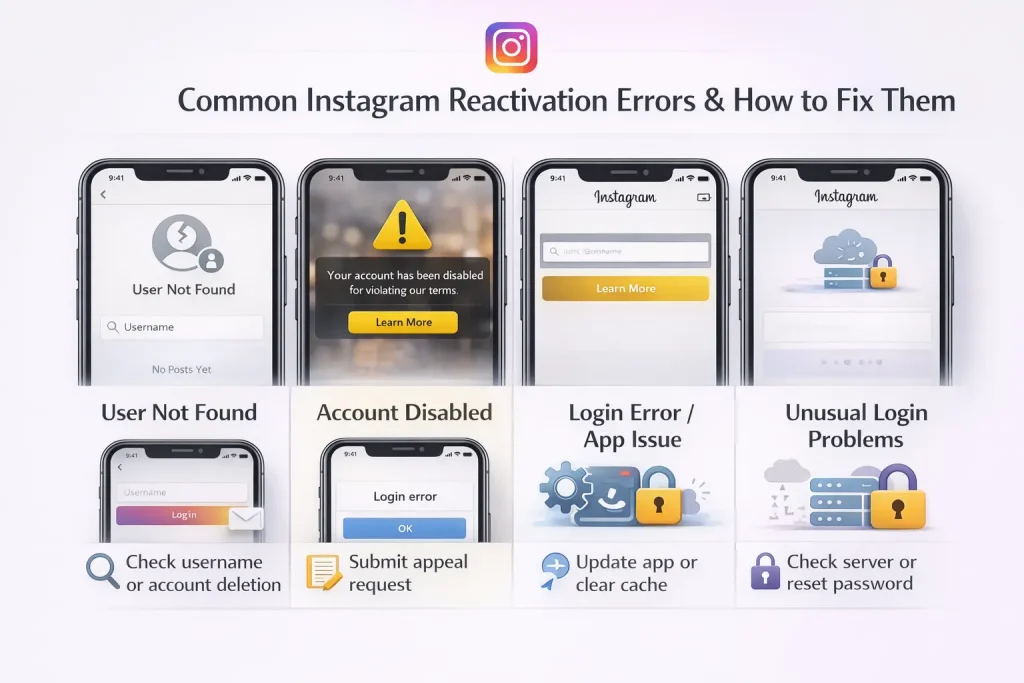
Can’t Log In? Fix Common Instagram Reactivation Errors
If reactivation should work but you cannot access your account, the issue is usually technical, credential-related, or security-triggered. Below are the most common login barriers and what they actually mean.
“User Not Found”
This error typically indicates one of three things:
-
The username is entered incorrectly (common with underscores or periods).
-
The account was permanently deleted.
-
The username was changed before deactivation, and you’re attempting the old one.
Try logging in with your registered email or phone number instead of the username. If the account truly no longer exists in Instagram’s system, it cannot be restored.
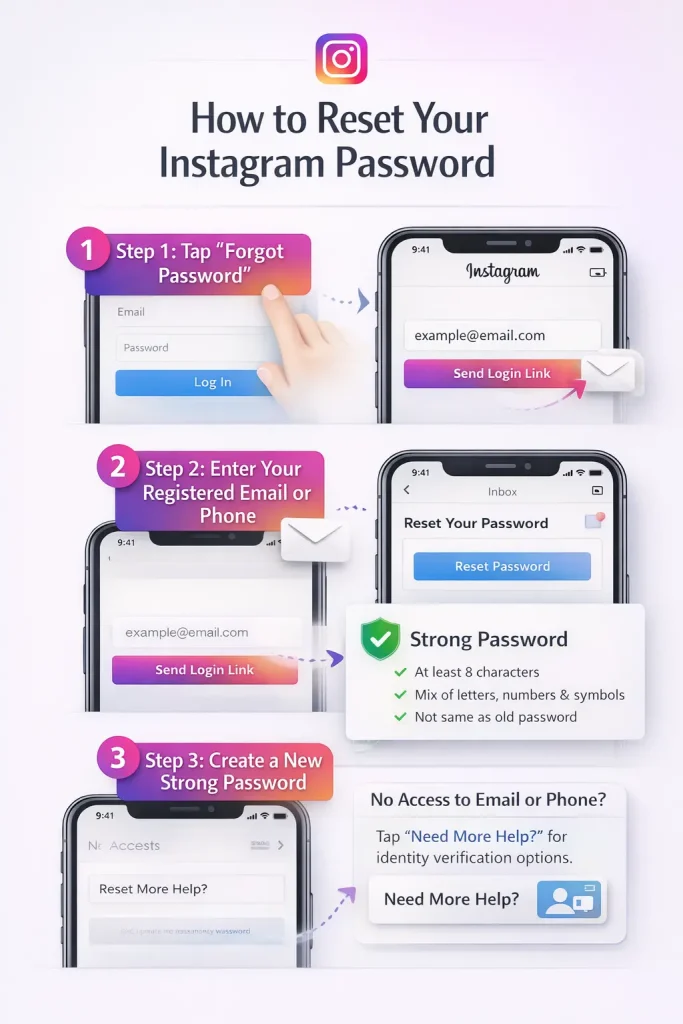
“Incorrect Password” (Even When You’re Sure It’s Right)
If you repeatedly see password errors:
-
Confirm Caps Lock is off.
-
Reset the password through the official recovery process.
-
Check if Instagram sent you a security alert email about suspicious login attempts.
Multiple failed login attempts may temporarily lock the account for security reasons. Waiting several hours before retrying can sometimes resolve the issue.
“Your Account Has Been Disabled”
If this message appears during login, the account is no longer in a simple deactivated state. It has entered Instagram’s enforcement system and requires formal review.
At this stage, login troubleshooting will not resolve access. The recovery path shifts to the appeal process.
App-Related Login Errors
If you see generic messages like “Login Error” or the app crashes:
-
Update the Instagram app to the latest version.
-
Clear the app cache (Android) or reinstall the app (iOS).
-
Try logging in via a web browser to rule out app-specific issues.
-
Check whether Instagram’s servers are experiencing outages.
If login works on web but not on mobile, the issue is device-related — not account-related.
Security Checkpoint or Verification Loop
Sometimes Instagram triggers identity verification before allowing access. This may include:
-
SMS code verification
-
Email verification
-
Suspicious login confirmation
If verification emails are not arriving, check your spam folder and confirm your registered email has not been changed.
If your email was changed without permission, this indicates account compromise rather than a login error.
How to Appeal a Disabled or Suspended Instagram Account
If Instagram disabled your account, access can only be restored through a formal review process. Login attempts alone will not reactivate it.
The appeal path depends on what Instagram allows you to see inside the app.
Appeal Directly From the Login Screen
When attempting to log in, Instagram often displays a message stating the account was disabled. In many cases, you’ll see an option such as “Request Review” or “Learn More.”
If this option appears:
-
Tap the review option.
-
Confirm your identity.
-
Submit any requested information accurately.
-
Provide a clear explanation if asked.
Be factual and concise. Avoid emotional language. Instagram’s review system prioritizes clarity and compliance details.
Use Account Status (If Accessible)
Some users can access Settings → Account → Account Status before full lockout occurs. This section shows:
-
Content removals
-
Policy violations
-
Whether the account is eligible for review
If a “Request Review” option appears here, submit the appeal directly through this pathway. This is often the fastest internal review channel.
Check the Support Inbox
If you previously submitted an appeal, Instagram may send updates through the Support Inbox inside the app. Always check there before submitting another request.
Submitting multiple appeals can slow the review process and reduce visibility of your original request.
Identity Verification Requirements
For certain suspensions, Instagram may request:
-
Government-issued photo ID
-
A selfie holding a verification code
-
Confirmation of previous account details (old usernames, signup email)
Provide exactly what is requested. Mismatched or incomplete information often results in automatic rejection.
When No Appeal Option Appears
If you do not see any review option:
-
Attempt login again after 24–48 hours.
-
Ensure the app is updated.
-
Access Instagram from a web browser to check if the review prompt appears there.
If the account is permanently banned for severe violations, appeal options may be removed entirely.
Review timelines vary. Some cases are resolved within a few days, while others can take longer depending on workload and violation type.
Remove Third-Party Apps Before You Appeal
Before submitting or following up on an appeal, review any third-party apps connected to your Instagram account. Automation tools are one of the most common triggers for account suspensions.
Instagram’s systems actively detect:
-
Auto-follow and auto-unfollow tools
-
Mass liking or commenting bots
-
Engagement pods
-
Unofficial analytics platforms requiring login access
-
Growth services promising rapid follower increases
Even if you did not directly violate content policies, automated behavior can flag your account for spam or suspicious activity.
How to Remove Connected Apps
-
Log in to Instagram.
-
Go to Settings.
-
Open Security.
-
Select Apps and Websites.
-
Review Active connections.
-
Remove any tools you do not fully trust or no longer use.
After removing these apps, change your password immediately. This invalidates previous login sessions and reduces security risk.
How Long Reactivation Takes (Timelines + Limits)
The time it takes to regain access depends entirely on the account status. Each scenario follows a different timeline governed by Instagram’s internal systems.
Temporarily Deactivated Accounts
Reactivation is typically immediate after successful login. However, profile visibility, follower counts, and direct messages may take several minutes to fully resync due to server refresh cycles.
There is no automatic expiration for temporary deactivation. The account remains stored until you either log back in or request permanent deletion.
Instagram allows temporary deactivation only once per week. If you recently reactivated, you must wait seven days before deactivating again.
Disabled or Suspended Accounts
Review timelines vary based on violation type and review volume.
-
Minor violations may be reviewed within a few days.
-
Complex or repeat cases can take longer.
-
During high enforcement periods, response times may increase.
Submitting multiple appeals does not speed up the process and can delay resolution.
If Instagram restores the account, access usually returns immediately without additional login steps.
Deletion Requests (Pending Deletion Window)
If you initiated permanent deletion, Instagram enters a pending deletion phase. Logging in during this window cancels the deletion request.
Once the deletion period expires, the account and its data are permanently removed and cannot be restored.
When There Is No Response
If no decision is communicated after an extended period:
-
Check the Support Inbox.
-
Monitor the email associated with the account.
-
Avoid creating duplicate appeals.
In some cases, silence may indicate permanent enforcement, especially for severe violations.
Conclusion: How to Reactivate Your Instagram Account
Reactivating your Instagram account starts with identifying its status. If you temporarily deactivated it, logging back in will usually restore your profile instantly. If your account was disabled, you’ll need to submit an appeal and complete any required verification steps. For hacked accounts, securing your login credentials is the priority before recovery.
Understanding the difference between deactivation, suspension, and permanent deletion is essential. By following the correct recovery path and using only Instagram’s official tools, you can safely restore access and protect your account from future issues.
When Professional Unban Support Becomes Relevant
If your account has been disabled and standard appeal attempts have failed, structured recovery assistance may become a practical consideration. InstaDeal specializes in handling complex Instagram ban cases where users believe enforcement was incorrect or unresolved through normal review channels. The Instagram unban service focuses on case evaluation, procedural handling, and structured follow-up, offering escrow-based payment protection and clearly defined recovery timelines. For users managing high-value or business-critical accounts, having experienced guidance can reduce uncertainty and improve the chances of a successful reinstatement.
FAQs:
My username shows as taken, but Instagram says my account doesn’t exist. What’s going on?
This is a very common pattern users report after deactivation or lockouts. It can happen when the username remains reserved while the profile isn’t publicly resolving or login is failing. The practical move is to try email/phone login and, if you suspect compromise, use Instagram’s recovery hub.
I get ‘There was a problem logging you into Instagram. Please try again soon.’ How do I fix it?
This error is often temporary (server/security throttling) or app-side. Try web login, update/reinstall the app, and wait if you’ve had many attempts in a short time. Users report it commonly during reactivation attempts.
How soon can I reactivate after deactivating?
Instagram’s official guidance is about the limit to deactivate (not a strict reactivation waiting period): you can only deactivate once per week. Reactivation typically happens when you log back in.
Instagram asked for a video selfie. How long does that take / what does it mean?
It’s an identity verification step used in some recovery/appeal paths. People report anywhere from quick resolution to extended delays; it usually means your case is in a verification queue.
My account was hacked and the email was changed. Can I undo that change?
Often yes—Instagram notes you may be able to deny the change from the original email notice (sent from [email protected]) or use the official hacked flow to secure the account.

Benjamin Amiri
Benjamin Amiri is a digital growth consultant and senior contributor at InstaDeal. He specializes in Instagram engagement strategies, Facebook ads innovation, and TikTok product marketing. With a track record of scaling brands and creator accounts, Benjamin turns performance data into actionable growth tactics that deliver measurable results.


