


Wondering what the best Instagram post ratio is in 2026? Choosing the wrong aspect ratio can lead to awkward cropping, blurry images, or a feed that looks unpolished.
Instagram has updated how it handles post dimensions, portrait formats, and grid previews—so ratios that worked in previous years may no longer be optimal. If you’re trying to grow engagement or maintain a clean profile layout, using the correct Instagram post ratio matters more than ever.
This guide breaks down the exact Instagram post aspect ratios supported in 2026, explains how each format appears in the feed and profile grid, and shows you which ratios perform best for visibility and consistency.
Quick Answer: The Best Instagram Post Ratio in 2026
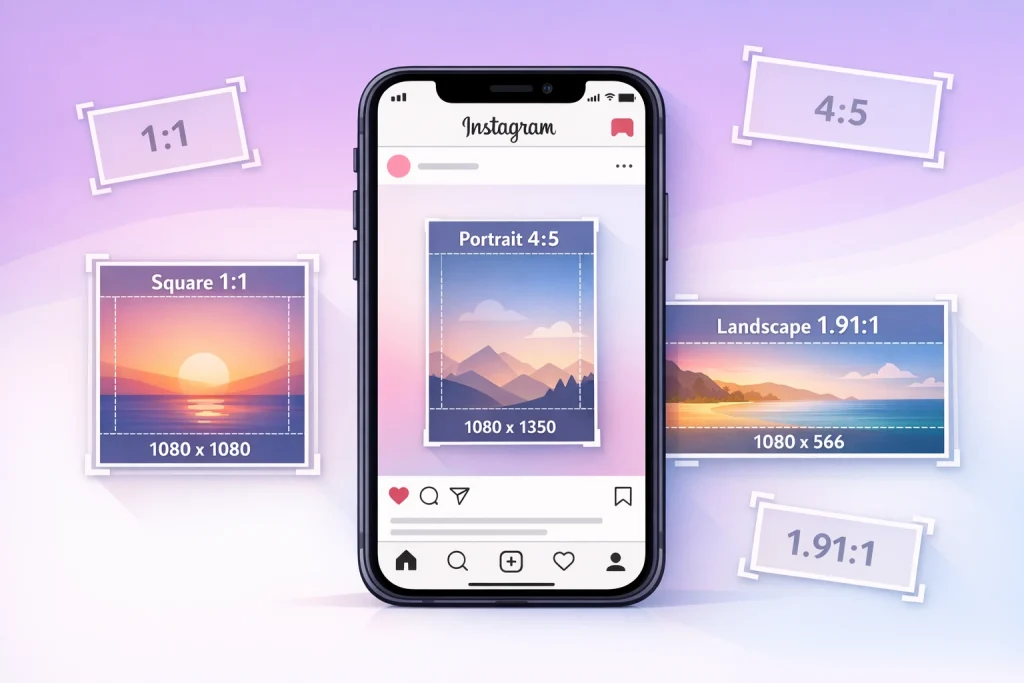
The best Instagram post ratio in 2026 is 4:5 (1080 × 1350 pixels).
This portrait ratio fills the most vertical space in the feed without being cropped and consistently performs well for engagement on mobile.
Best Instagram post ratios by use case:
-
Best overall: 4:5 portrait (1080 × 1350 px)
Ideal for most photos and graphics. Maximizes feed visibility without grid issues. -
Best for taller images: 3:4 portrait (1080 × 1440 px)
Newly supported. Works well for vertical photography, but requires careful centering for grid previews. -
Best for grid consistency: 1:1 square (1080 × 1080 px)
Clean, uniform look across your profile. -
Best for wide visuals: 1.91:1 landscape (1080 × 566 px)
Suitable for panoramas or cinematic shots, but takes up less screen space.
What Aspect Ratio Means for Instagram Posts
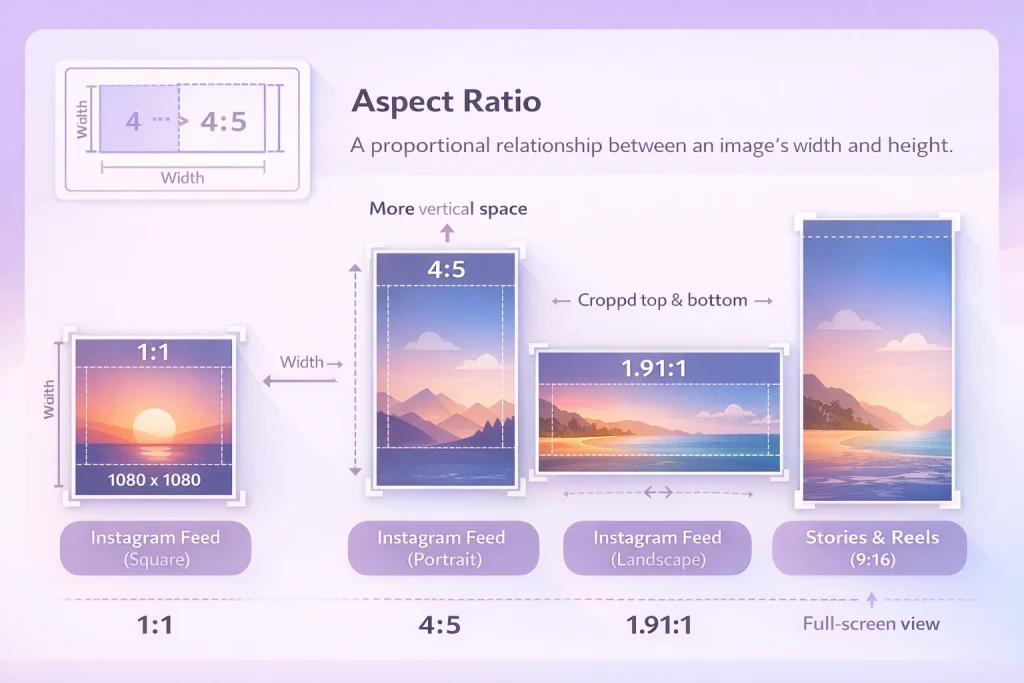
Aspect ratio defines the proportional relationship between an image’s width and height. On Instagram, aspect ratios determine how your post is framed across the feed, profile grid, Stories, and Reels.
Aspect ratio vs dimensions (simple explanation)
Aspect ratio is expressed as two numbers, like 1:1 or 4:5. This tells you how wide your image is in relation to its height. Dimensions, on the other hand, refer to the actual pixel size—such as 1080 × 1350.
For example:
-
A 1:1 aspect ratio at 1080 pixels wide = 1080 × 1080 px
-
A 4:5 ratio at 1080 wide = 1080 × 1350 px
You can use any image dimensions as long as the aspect ratio falls within Instagram’s supported range. However, sticking to recommended dimensions helps maintain clarity and prevent compression issues.
How aspect ratio affects feed, grid, and cropping
Your chosen aspect ratio impacts how your post looks in three places:
-
Feed: Instagram shows the full post within its supported aspect ratio range (1.91:1 to 3:4)
-
Profile grid: All posts are cropped into 1:1 squares
-
Stories & Reels: Only 9:16 vertical ratios are displayed full-screen
This is why it’s important to plan your composition based on where the post will appear. For feed content, portrait ratios like 4:5 or 3:4 grab more vertical space, but should be centered to avoid losing key visuals in the grid crop.
What Changed in 2025–2026 (Why This Matters Now)
Instagram has expanded its support for taller post formats and adjusted how profile grids preview your content. These changes directly impact how you should size and frame your posts for maximum visibility and aesthetic appeal.
3:4 photos are now supported (1080 × 1440)
In previous years, Instagram capped portrait feed posts at a 4:5 aspect ratio. As of late 2025 and into 2026, the platform now supports 3:4 photos—allowing vertical images up to 1080 × 1440 pixels.
This update benefits photographers and mobile-first creators who shoot in taller native formats. You no longer have to crop or pad these images to fit Instagram’s earlier height limitations.
How taller posts affect your profile grid preview
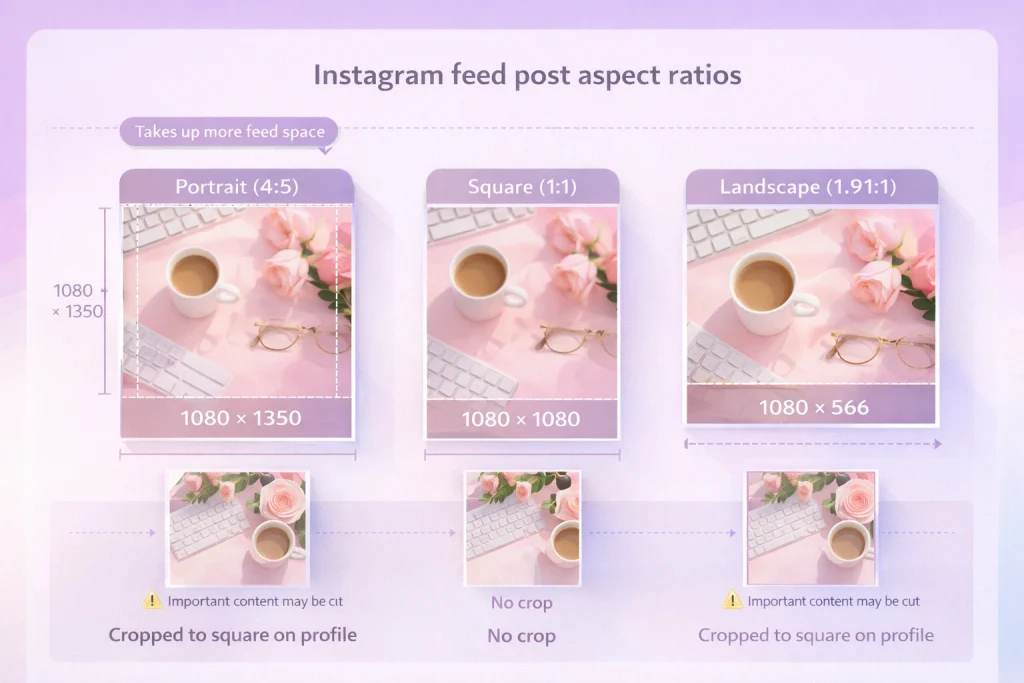
While the feed supports taller posts, Instagram’s profile grid still displays all images as 1:1 square previews. This means that even a 3:4 or 4:5 post will be center-cropped in your grid view.
To avoid losing important details:
-
Keep key subjects and text within the center of your image
-
Use padding or safe zones when necessary
-
Preview your post before publishing using Instagram’s in-app draft tools
Understanding this visual shift can help you maintain a clean, cohesive grid without compromising the impact of taller feed content.
Instagram’s Supported Feed Aspect Ratios (1.91:1 to 3:4)
Instagram officially supports feed photo aspect ratios ranging from 1.91:1 to 3:4. Staying within this range ensures your posts display properly without unexpected cropping or quality loss.
Minimum and maximum ratios Instagram allows
The minimum supported aspect ratio for feed photos is 1.91:1, which suits wide, horizontal visuals. The maximum supported aspect ratio is 3:4, allowing for taller portrait images up to 1080 × 1440 pixels.
While older guides emphasized square (1:1) or portrait (4:5) as the tallest supported formats, Instagram has since expanded this limit. You can now upload taller portrait images—up to a 3:4 ratio—without forced cropping.
Why Instagram no longer limits posts to 4:5
Instagram began supporting taller photos beyond the 4:5 limit in recent updates to better accommodate native smartphone photography. This change allows creators to upload vertically framed shots (like those taken in a phone’s default camera orientation) without resizing.
Posts taller than 3:4 or wider than 1.91:1 may still be accepted, but Instagram will automatically crop them to fit within the supported range. To avoid this, format your images in advance to the correct aspect ratio.
Instagram Feed Post Aspect Ratios Explained
Instagram allows three main formats for feed posts: portrait, square, and landscape. Each has different strengths depending on the type of content you’re sharing and how you want it to appear in the feed and grid.
Portrait posts (4:5 and 3:4): when to use each
-
4:5 (1080 × 1350 px): This has been the most commonly used portrait format. It takes up significant vertical space in the feed and draws attention while scrolling.
-
3:4 (1080 × 1440 px): Newly supported, this taller format better aligns with many smartphone photos. It’s ideal for vertical subjects like fashion, food, or product shots.
Both are great for maximizing screen space, but should be centered carefully to account for the square crop in your profile grid.
Square posts (1:1): pros and limitations
-
1:1 (1080 × 1080 px): The original Instagram format. Square posts are easy to create and appear consistent in both the feed and your profile grid.
-
The limitation is screen presence—square images take up less space in the feed compared to portrait posts, which can reduce engagement on mobile.
Use square posts if you prioritize grid harmony or have content designed to be viewed symmetrically.
Landscape posts (1.91:1): best uses and risks
-
1.91:1 (1080 × 566 px): Best for wide scenes like landscapes, group shots, or cinematic visuals.
-
These posts show less vertical content in the feed and are more likely to be overlooked during scrolling.
If you use this format, frame your subject near the center and avoid placing key details at the edges, which may get cropped in previews or when auto-resized.
Recommended Instagram Post Sizes in Pixels (Quick Reference)
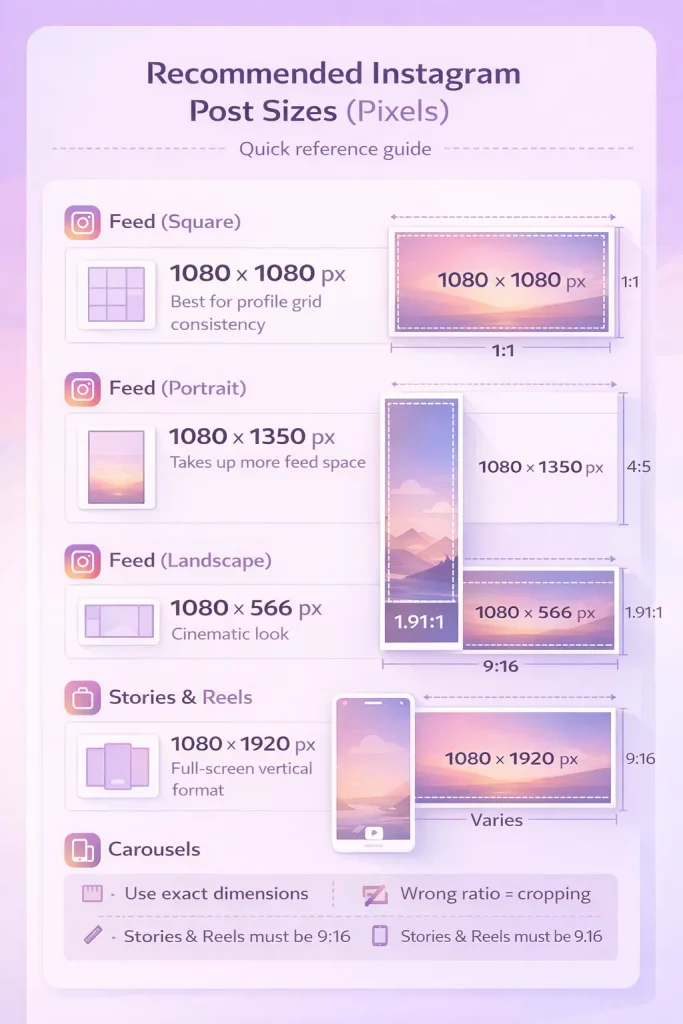
Using the correct post dimensions ensures your content displays clearly and avoids unnecessary cropping or compression. Instagram recommends uploading images at 1080 pixels wide, with height adjusted based on the supported aspect ratio.
| Post Type | Recommended Dimensions (px) | Aspect Ratio |
|---|---|---|
| Feed (Square) | 1080 × 1080 | 1:1 |
| Feed (Portrait) | 1080 × 1350 | 4:5 |
| Feed (Portrait – Tall) | 1080 × 1440 | 3:4 |
| Feed (Landscape) | 1080 × 566 | 1.91:1 |
| Stories & Reels | 1080 × 1920 | 9:16 |
| Carousels | Match all slides | 1.91:1 to 3:4 |
These dimensions fall within Instagram’s supported range of 1.91:1 to 3:4. Staying within these bounds prevents Instagram from cropping or resizing your content automatically.
Feed post sizes (square, portrait, landscape)
Choose square posts for simplicity and symmetry, portrait posts to occupy more vertical space, and landscape posts when showcasing wide scenes. For best results, always export your images at 1080px wide.
Stories and Reels sizes (9:16)
Stories and Reels require full-screen vertical formatting. Use 1080 × 1920 px (9:16 ratio) to fill the screen without black bars or padding. This format is also compatible with Instagram’s camera and editing tools.
Carousel size rules (why all slides must match)
Instagram carousels require each slide to share the same aspect ratio. If one slide differs, Instagram will automatically crop the others to match the first. Before uploading a carousel, make sure all images or videos are sized consistently—for example, all portrait at 1080 × 1350 px. If you’re unsure how carousel formatting works behind the scenes, understanding how Instagram carousels work can help explain why mismatched slide sizes trigger automatic cropping.
Once your images are correctly sized, the process of adding multiple photos to a single post is straightforward as long as each slide uses the same dimensions.
Portrait 4:5: best uses and when to avoid it
The 4:5 portrait ratio is ideal for vertical photos or videos designed to capture attention on mobile screens. This aspect ratio fills more of the viewer’s screen compared to square or horizontal formats, making it a favorite for showcasing individual portraits, close-ups, or content where the subject is the main focus. For example, lifestyle bloggers and photographers often use this ratio to highlight details like outfits or products.
However, this format isn’t suitable for every type of content. Wide group photos or scenes with important details near the edges should be avoided, as the 4:5 crop can cut off critical elements. To prevent this, always ensure key subjects and text overlays are positioned within the central “safe zone.” This practice minimizes the risk of cropping issues, especially when your post appears in a feed or preview.
Stories & Reels Safe Zone (Avoid UI Cropping)
Stories and Reels use a 9:16 aspect ratio (1080 × 1920 px), but not every pixel is visible. Instagram overlays user interface elements—like profile names, message icons, and interaction buttons—on top of your content, which can obscure important visuals or text.
Safe area dimensions (what to keep clear)
To avoid content being hidden behind Instagram’s interface, keep critical elements—like logos, captions, and faces—within the central 1080 × 1610 px zone. This leaves a 310-pixel buffer (155 pixels top and bottom) as a safety margin.
Design tools like Canva, Adobe Express, and Figma offer built-in Instagram Story templates with safe zones marked, making it easier to plan content.
Common mistakes that cause text to be cut off
-
Placing text too close to the top or bottom edges
-
Relying on centered auto-caption tools without previewing
-
Overlapping buttons or icons in call-to-action slides
Before posting, use Instagram’s in-app preview or third-party templates to ensure your content fits comfortably within the visible area.
How Instagram Crops Posts in the Feed vs Profile Grid
Instagram displays your posts differently depending on where they appear. Even if your content looks perfect in the feed, it may be automatically cropped when shown in your profile grid.
Why everything becomes square on your grid
Your profile grid uses a fixed 1:1 aspect ratio. That means all feed posts—whether portrait, landscape, or 3:4—are shown as center-cropped squares in grid view. If your post contains important details near the top or bottom, they may be cut off.
For example:
-
A 4:5 portrait post will appear fine in the feed but lose its top and bottom in the grid.
-
A 1.91:1 landscape post may have its sides trimmed in grid view.
How to design images that survive the grid crop
To maintain visual impact:
-
Center key elements like text, logos, and subjects
-
Avoid placing important content near the outer edges
-
Use preview tools or padding to create a “safe center zone”
If grid aesthetics are part of your Instagram strategy, designing with the 1:1 preview in mind is essential—even for non-square posts.
How Instagram Compresses Images (And How to Stay Sharp)
Instagram automatically compresses every photo and video you upload. This helps the app load faster but can also reduce image clarity if your content isn’t properly sized.
Best upload width and resolution
To avoid unnecessary compression:
-
Always upload images at 1080 pixels wide
-
Use the correct aspect ratio (between 1.91:1 and 3:4 for feed posts)
-
Stick with standard file types: JPEG or PNG
-
Keep file sizes under 30MB
Uploading an image smaller than 320 px wide—or with an unusual ratio—can result in upscaling or automatic cropping, which degrades quality.
Why images look blurry after posting
Common causes of blurry Instagram posts include:
-
Uploading low-resolution images (e.g., screenshots)
-
Excessive in-app filtering or over-editing
-
Using third-party resizing tools that distort the original file
-
Instagram’s compression algorithm downsizing oversized files
To preserve sharpness, prepare your content using trusted design tools, save it in the correct dimensions, and avoid over-compressing before upload. Uploading directly from your device’s gallery (without additional compression apps) also helps retain clarity.
Conclusion: What Ratio is Best for Instagram Posts
Choosing the best Instagram post ratio ensures your content looks sharp, intentional, and optimized for how Instagram displays posts in both the feed and profile grid.
For most creators in 2026, 4:5 remains the safest and most effective ratio, while the newer 3:4 format offers more flexibility for taller images when designed carefully. No matter which format you use, keeping key visuals centered and exporting at the correct dimensions helps prevent unwanted cropping and compression.
By using the right Instagram post ratios consistently, you can improve visual quality, maintain a professional grid, and give your content the best chance to stand out while scrolling.
Account ownership and long-term content control
When managing an Instagram presence, choices like image size, aspect ratio, and formatting affect not only visibility but also how professionally an account is perceived over time. For accounts that change hands, maintaining consistent content standards becomes part of responsible ownership and operational continuity. Marketplaces such as InstaDeal, which focus on the buying and selling of Instagram accounts, often highlight the importance of understanding platform mechanics so new owners can maintain stability, presentation quality, and compliance after a transfer.
FAQ: Cropped, Blurry, or Wrong Size Instagram Posts?
Why is Instagram cropping my photo even though it’s 4:5?
Common causes: the image isn’t exactly 4:5 in pixels, you’re mixing ratios in a carousel, or your app/account hasn’t fully received the latest layout updates (some users report inconsistent rollouts).
Why do carousels force everything into one crop?
Because Instagram applies one aspect ratio to the entire carousel. If any slide differs, Instagram will crop other slides to match the first slide’s ratio.
Why does my grid preview crop my portrait posts?
Your profile grid may show rectangle previews for some accounts/rollouts, but cropping still happens. Design with a center-safe area so your key subject/text stays visible in any preview crop.
Why does my post look blurry after uploading?
Instagram compresses uploads. Start with the recommended width (at least 1080px) and a supported ratio so Instagram doesn’t resample aggressively. Low-res files or heavy re-exports often look worse.
What’s the best export size to avoid compression?
A safe standard for feed posts is 1080px wide at your chosen ratio (e.g., 1080×1350 or 1080×1440). This aligns with Instagram’s guidance and minimizes avoidable resizing.

Benjamin Amiri
Benjamin Amiri is a digital growth consultant and senior contributor at InstaDeal. He specializes in Instagram engagement strategies, Facebook ads innovation, and TikTok product marketing. With a track record of scaling brands and creator accounts, Benjamin turns performance data into actionable growth tactics that deliver measurable results.


