



Knowing how to tag someone on an Instagram Story makes sharing, crediting, and collaborating effortless. Whether you use text mentions, stickers, or post-publish mentions, understanding Instagram’s rules ensures your tags always work.
How we verified this: We referenced publicly available documentation and reputable guides to explain what Instagram currently shows (and doesn’t show). Features can vary by app version and region, so if your menus look different, update the app and check Instagram’s settings/help pages.
In this guide, you’ll learn exactly how to tag someone on Instagram story using the built-in tools. We’ll walk you through the steps, explain tagging limits, and help you avoid common mistakes that could prevent your tag from working.
Quick Answer:
To tag someone on an Instagram Story, type @username using the text tool or add the @mention sticker before posting. You can also use Add Mentions after posting (if available).
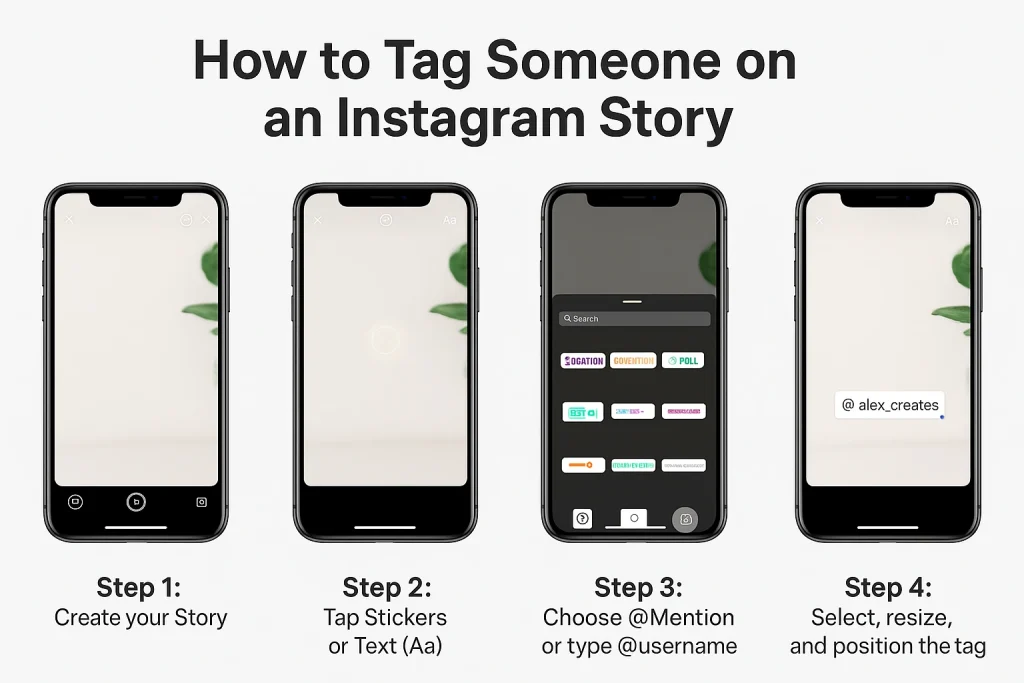
How to Tag Someone on an Instagram Story (2 Easy Methods)
Tagging someone in an Instagram Story lets you mention their account so they’re notified and your viewers can tap their username to visit their profile.
Instagram currently allows two ways to do this: using the text tool or the @mention sticker.
Method 1: Tag with Text (@username)
-
Open Instagram and tap the + icon to start a new Story.
-
Capture a photo or video, or select one from your gallery.
-
Tap the Aa text tool in the top-right corner.
-
Type @ followed by the person’s exact username (e.g.,
@alexsmith). -
Tap the correct account from the suggestion list to complete the tag.
Method 2: Use the @Mention Sticker
-
Open the sticker tray by tapping the square smiley icon.
-
Select the @mention sticker from the options.
-
Type the username you want to tag.
-
Position or resize the sticker on your Story before posting.
Both methods create a clickable tag that notifies the person you’ve mentioned and lets viewers navigate directly to their profile. If their account is private or you’re restricted from tagging them, the mention may not go through.
How to Tag Someone After Posting Your Story (Using “Add Mentions”)
Instagram offers a feature called “Add Mentions” that lets you tag someone even after your Story has already been posted. This is useful if you forgot to tag someone during the original upload or need to include someone based on viewer feedback.
To tag someone after posting:
-
Open your posted Story from your profile.
-
Tap the three-dot menu (•••) in the bottom-right corner.
-
Select “Add Mentions” from the menu.
-
Type the username of the person you want to tag and confirm.
Once added, the tagged person receives a direct message with a preview of the Story, just like a normal tag. Their username won’t appear visibly in the Story itself, but the mention behaves the same: it notifies them and allows them to reshare it to their own Story, if their settings permit.
Note: The “Add Mentions” feature is not available on all accounts. If you don’t see this option, try updating your app, or use a workaround by downloading the Story and reposting it with the tag added before sharing again.
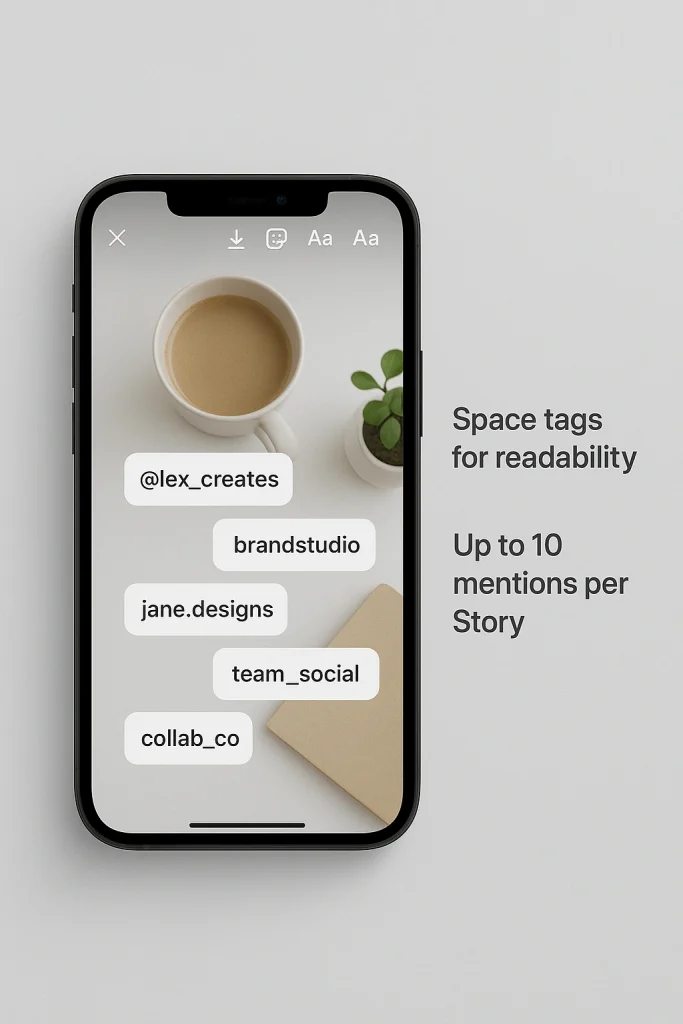
How to Tag Multiple People in One Story (Limits and Layout Tips)
Instagram lets you mention more than one person in a single Story, making it easy to acknowledge groups, collaborators, or friends in one post. According to Instagram’s latest guidelines, you can mention up to 20 accounts per individual photo or video shared to your Story.
To tag multiple people:
-
Create your Story content using the camera or upload from your gallery.
-
Use the text tool or the @mention sticker to type @username for each person.
-
Confirm each username by selecting the correct account from the suggestions.
-
Repeat the process for up to 20 unique usernames.
When tagging multiple users, it’s important to space the mentions out visually. Avoid clustering them in one area, as this can make the Story feel cluttered and reduce visibility for each mention. Adjust the size, color, and placement of each tag so that they remain legible but don’t dominate the design. You can also split mentions across multiple Story slides for better readability.
Keep in mind that each person you tag will receive a notification and may have the option to reshare your Story, depending on their privacy settings.
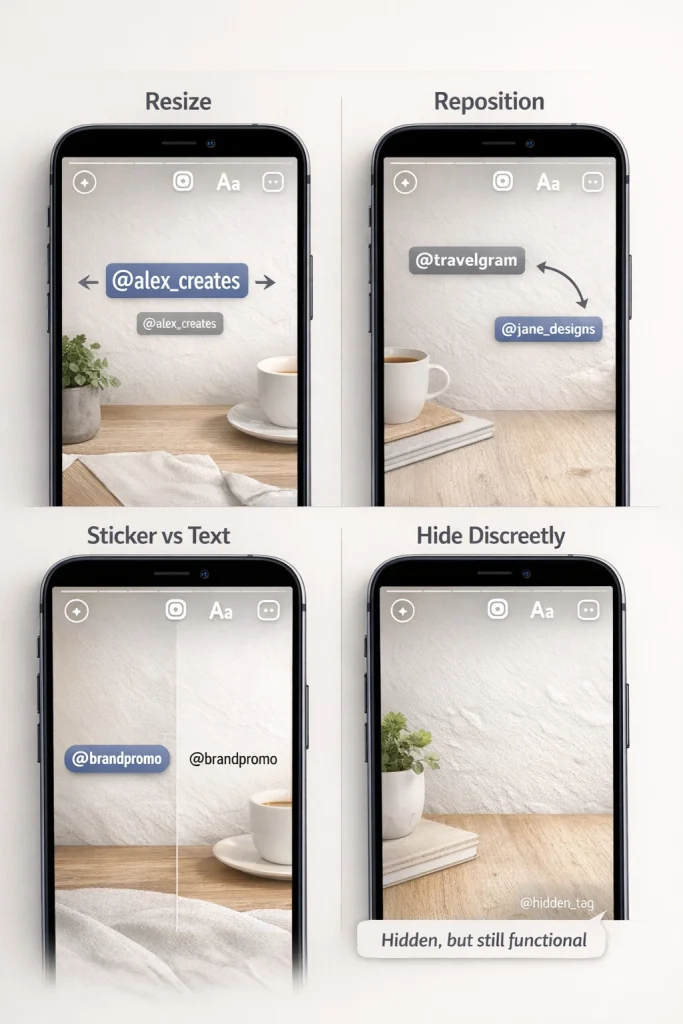
Customize Your Mention (Size, Placement, Sticker vs Text)
Tagging on Instagram Stories isn’t just functional—it’s also visual. You can customize how a mention appears to match the style of your Story and ensure it supports your message without distracting from the content.
Adjusting Size and Placement
After adding a tag, you can pinch the text or sticker to resize it—pinch inward to make it smaller, outward to enlarge it. You can also drag the tag anywhere on the screen. Placing tags in corners or alongside image elements helps keep your layout clean while still making the mention accessible.
Avoid placing tags over faces, key visuals, or important captions. A well-positioned tag should be noticeable without dominating the viewer’s attention.
Sticker vs Text Mention
Instagram supports two main tag styles:
-
@Mention Sticker: Found in the sticker tray, it’s visually bold and often used for casual or promotional Stories. It stands out and is ideal for highlighting someone clearly.
-
Text Tool Mention: More subtle and flexible, added using the standard text tool by typing
@username. You can match the font, size, and color to your Story’s theme for a more integrated look.
Hidden Mentions (Use Carefully)
Some users choose to hide mentions by shrinking the tag very small, moving it off-screen, or matching its color to the background. While this can maintain a clean design, it’s important to use this method responsibly—especially when crediting someone or collaborating. Hidden tags still notify the user if entered correctly, but should not be used to mislead or obscure attribution.
When designing a clean layout, it helps to think about mentions the same way you would when adding links to Instagram Stories, ensuring every interactive element is visible but not distracting.
Tagging someone in your Instagram Story triggers several actions that affect both you and the person mentioned. Understanding how tags behave after publishing can help you use them more strategically.
The Person Gets Notified
When you mention someone in your Story using @username or the @mention sticker, Instagram sends them a direct message notification with a preview of the Story. This ensures the tagged person sees it even if they’re not actively browsing their feed.
If the user has mention notifications disabled, they may not receive an alert, but the mention still appears in their Activity feed or the “Mentions” tab if they check manually.
If the person you mention has resharing permissions enabled, they’ll see a “Add This to Your Story” option directly from the DM or preview screen. This allows them to repost your Story to their followers, which increases your reach and engagement.
Note: If their account is private or they restrict story resharing, this option may not appear even if you tag them correctly.
Visibility Depends on Both Accounts
When you tag someone, their profile becomes tappable within your Story. However, who sees that mention depends on:
-
Your Story visibility settings (close friends, hidden users, public/private account)
-
Their privacy settings, particularly around mentions and resharing
Mentions in private Stories will still notify the tagged person, but only followers you’ve approved will see the Story itself.
Instagram also aggregates tagged content under the “Stories About You” section of a user’s profile, if they’ve enabled that feature.
Why You Can’t Tag Someone in Your Story (Fixes by Cause)
If your Instagram tag isn’t working—whether the username doesn’t appear, can’t be selected, or the person never gets notified—there are several possible reasons. Most are tied to privacy settings, account restrictions, or technical issues. Here’s how to identify the cause and resolve it.
1. Their Mention Settings Don’t Allow It
Instagram allows users to control who can mention them in Stories. If their setting is restricted to “People You Follow” or “No One,” your tag won’t go through.
Fix: Ask the person to check their mention settings at:
Settings > Privacy > Mentions
They can change it to allow mentions from everyone, followers, or restrict them completely.
2. You’ve Been Blocked or Muted
If the person has blocked you, you won’t be able to tag them. Muting doesn’t affect tagging directly, but blocking removes all interaction access—including mentions.
Fix: You can’t tag someone who has blocked you. If it’s an error, you’ll need to resolve it outside the app.
3. Username Has Changed
Tagging only works with current usernames. If someone recently updated their handle, older tags will break, and attempts to tag with the old username will fail.
Fix: Double-check the spelling and try searching their updated handle. Instagram’s auto-suggestions usually reflect current usernames quickly.
4. Account Type or Privacy
Some accounts, especially minors or brand-new users, have default restrictions on who can tag or mention them. Additionally, private accounts may limit visibility of tags, even if allowed.
Fix: You can still tag them, but Story visibility may be restricted. You may want to confirm their settings if your tag appears unlinked.
5. Temporary Account Restrictions or Action Blocks
Instagram may temporarily limit your ability to tag users if it detects spammy behavior—such as tagging too many people in a short time, using automation tools, or violating community guidelines.
Fix: Wait 24–48 hours without tagging activity. Also check for in-app warnings under Account Status.
6. Technical Issues (App, Cache, Connectivity)
Outdated app versions or poor internet connections can interrupt tagging functionality.
Fix:
-
Update your Instagram app to the latest version.
-
Restart the app or your device.
-
Clear Instagram’s cache via your phone’s app settings.
If the issue persists, uninstall and reinstall the app for a clean reset.
Mention vs Tag on Instagram Stories: What’s the Difference?
While “tag” and “mention” are often used interchangeably, Instagram makes a clear distinction between the two—especially when it comes to Stories.
Mentions in Stories
A mention refers to including someone’s username in a Story using the @ symbol (e.g., @username) through either the text tool or the @mention sticker. This is the primary form of recognition in Stories and serves several functions:
-
Notifies the person via direct message
-
Creates a clickable link to their profile
-
Allows the mentioned person to reshare your Story (if enabled)
Mentions are subject to privacy controls, meaning users can choose who is allowed to mention them.
Tags in Posts (Not Stories)
A tag, in Instagram’s terminology, generally refers to labeling someone in a photo or video post—not a Story. This involves linking an account to a physical spot in an image. For example, in a group photo, you might tag someone’s face or body using the “Tag People” feature before posting.
Tagged users are listed publicly on the post under “Tagged People,” and they can choose to hide the tag or remove themselves.
Account Control and Story Mentions
Understanding how Story mentions, visibility, and privacy settings work is especially relevant when managing or transferring an Instagram account. On marketplaces like InstaDeal, which focus on buying and selling Instagram accounts, account-level features such as tagging permissions and interaction history can affect how an account is perceived and operated after ownership changes. Clear control over mentions helps maintain consistency, avoid unintended interactions, and ensure the account functions as expected in different hands.
FAQ: Limits, Privacy, and Visibility
Tagging people on Instagram Stories can enhance engagement, but there are some important details to keep in mind about limits, privacy, and notifications.
When I tag someone in my Story, they don’t get a notification
If they don’t receive a notification, it can be due to their mention/notification settings or because they have disabled mention alerts in their Instagram settings.
My mention/tag doesn’t show up for others or me!
Instagram may delay or suppress visible mention entries if the account has privacy restrictions, temporary glitches, or if the app version is outdated. Confirm your app is updated.
Why I am temporarily blocked from tagging?
Instagram can temporarily restrict tagging if it detects spam-like behavior, rapid tagging, or use of automation tools. These blocks usually clear within 24-48 hours once normal behavior resumes.
Conclusion
Tagging someone in an Instagram Story is simple once you know the options—and powerful when used thoughtfully. Whether you’re mentioning someone before posting, adding a mention later, or tagging multiple people, understanding Instagram’s limits and privacy rules helps avoid common issues. By using mentions strategically and respectfully, you can boost engagement, give proper credit, and make your Stories more interactive without friction.

Benjamin Amiri
Benjamin Amiri is a digital growth consultant and senior contributor at InstaDeal. He specializes in Instagram engagement strategies, Facebook ads innovation, and TikTok product marketing. With a track record of scaling brands and creator accounts, Benjamin turns performance data into actionable growth tactics that deliver measurable results.


