


How to Hide Following List on Instagram: The Quick Answer
Wondering how to hide your following list on Instagram? The short answer: you can’t make it completely invisible. Instagram doesn’t offer a dedicated button, but you can control who sees it. Switching to a Private account keeps your following list hidden from non-followers, and tools like block, remove, or restrict help you manage specific people.
This guide breaks down exactly how to do it step by step, clears up myths about hidden toggles, and shows you the extra privacy settings worth turning on in 2025.
Step-by-Step: How to Make Your Instagram Account Private
Since Instagram doesn’t give us a direct “hide following list” button, the real solution is switching to a Private account. It only takes a minute, no matter which device you’re on.
On iPhone (iOS):
Open Instagram and tap your profile picture (bottom right).
Tap the three lines (top right).
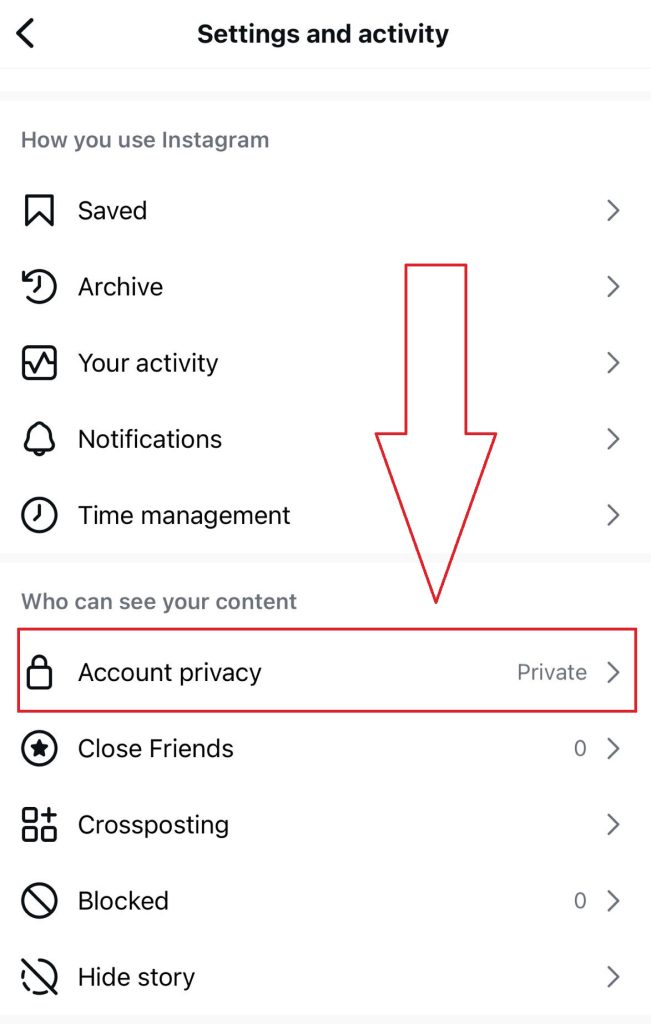
Choose Settings and activity.
Scroll to Account Privacy.
Toggle on Private Account and confirm.
On Android:
Same steps—look for Settings and Privacy → Account Privacy → Private Account.
On desktop (Web):
Click your profile picture (top right).
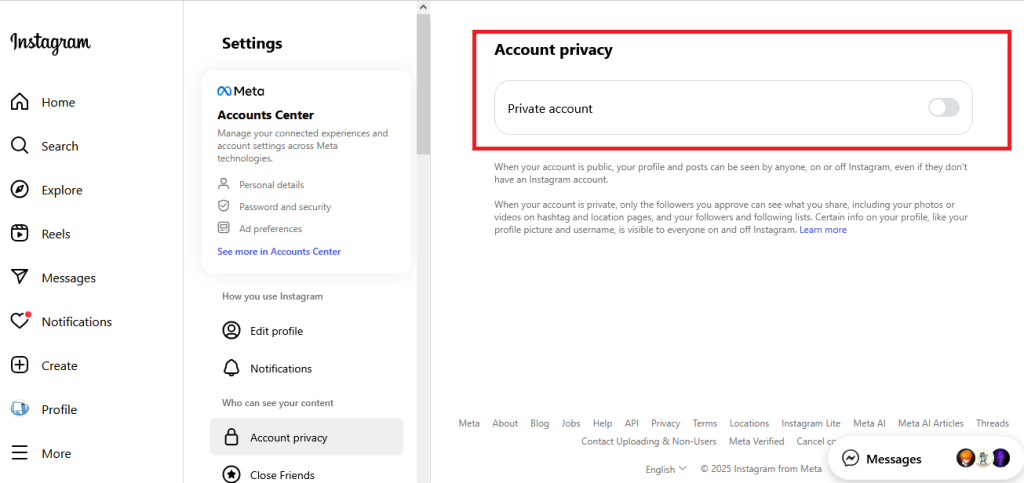
Go to Settings → Account privacy.
Tick the box for Private Account.
Here’s what that means in practice:
Public accounts → Anyone can see your following list, posts, and followers.
Private accounts → Only people you approve as followers can see that information.
Business or Creator accounts → These can’t go private. If you want full privacy control, you’ll need to switch back to a Personal account first.
For more information, check out official Instagram Help guide.
Who Can See Your Following List on Instagram? (Public vs Private vs Blocked)
This is where most of the confusion happens. People think “private” means invisible, but that’s not really the case. Different account settings change who can see your following list, posts, or activity. To make it crystal clear, here’s a quick cheat sheet:
| Feature | Public Account | Private Account | Restricted / Blocked |
|---|---|---|---|
| Posts & Reels | Visible to everyone | Only approved followers | Blocked: hidden completely; Restricted: still visible but interactions limited |
| Stories | Visible to everyone (unless you use “Close Friends”) | Only approved followers | Blocked can’t see; Restricted still can, unless muted |
| Followers list | Anyone can see it | Only approved followers | Blocked users can’t see; Restricted still can |
| Following list | Anyone can see it | Only approved followers | Blocked can’t see; Restricted still can |
| Activity status (“last active”) | Everyone you follow + message | Everyone you follow + message | Blocked = hidden; Restricted = hidden from them too |
A few key takeaways:
Private ≠ invisible. Your approved followers still see your following list.
Restrict is more subtle than blocking—it limits comments and messages but doesn’t hide your following list.
Block is the nuclear option: the person basically loses all access to your profile, including your following/follower lists.
So, if your goal is just “I don’t want randoms snooping,” private mode does the trick. If you’re trying to keep specific people out, that’s where block or remove comes in.
How to Hide Following List from Specific People on Instagram?
Even with a private account, your approved followers can still peek at who you follow. So if there’s someone specific you don’t want snooping, you’ve got three main tools at your disposal:
1. Remove a follower
- Go to your profile, tap Followers, find the person, and hit Remove.
- They won’t be notified (thankfully). But if your account is public, they can still refollow you—so this only really works if you’re private.
2. Restrict
- Restricting is the “soft block.” Their comments only show up to them, their DMs go to a request folder, and your activity status disappears for them.
- Downside? It doesn’t hide your following list. They’ll still see it if they’re a follower. This is more about limiting interaction than visibility.
The ‘Restrict’ option can be confusing if you haven’t used it before. We’ve covered what Instagram means by ‘We restrict certain activity and how it impacts your interactions.
3. Block
- The nuclear option. Once blocked, they can’t see your profile at all—no posts, no following list, nothing.
- They also can’t search you directly (though your likes/comments on public content could still surface).
Quick cheat code to decide:
- Just want them out quietly? Remove.
- Want to freeze their access without drama? Restrict.
- Want total invisibility? Block.
Best Instagram Privacy Settings to Use Alongside Hiding Your Following List
Instagram has a bunch of other switches that help tighten things up:
Check these settings right now:
- Activity Status → Toggle this off if you don’t want people knowing when you’re online or “last active.” You’ll lose the ability to see others’ status too, but honestly, most users don’t miss it.
- Close Friends (Stories) → Share personal stories only with your inner circle. Perfect for keeping casual followers out of your day-to-day. If you’re also wondering how to manage your Stories visibility, check out our guide on how to hide Instagram Highlights. Pairing both tricks gives you more control over what people can (and can’t) see.
- Hidden Words (DMs) → Found in Privacy → Messages, this lets you auto-filter offensive words or spammy phrases so they never even hit your inbox.
- Limits → A lifesaver if you’re dealing with harassment or a sudden influx of trolls. It restricts interactions from accounts that don’t follow you (or only followed recently).
- Tagging & Mentions → Set these to “People you follow” or “No one” if you want to stop strangers from tagging you in random content.
You can layer them together. For example, pairing a Private account with Close Friends and Hidden Words gives you near-total control over who sees what and who can reach you. Formore information, check this Wired’s guide to Instagram privacy settings.
Myths About Hiding Your Following List on Instagram (Don’t Fall for These)
You’ve probably seen screenshots or articles claiming there’s a “Hide Following List” switch under Privacy. The truth is that toggle doesn’t exist in the real Instagram app. Some blogs mix up privacy settings or use mock-up screenshots to grab clicks.
Now, some third-party apps even claim to ‘unlock hidden privacy features,’ but that’s risky business. Accounts caught using them can get flagged or banned. Here’s a breakdown of temporary vs permanent Instagram bans. It’s Tempting, but dangerous. Here’s why:
- Security risk → These apps usually need your login. That means handing your Instagram credentials to an unverified service. Not worth the gamble.
- Against Instagram’s terms → Using unofficial tools can get your account flagged or suspended. Meta has been cracking down hard on shady integrations.
- They rarely work → Even if the app gives you a pretty dashboard, it can’t override Instagram’s privacy rules. At best, it’s smoke and mirrors.
So If Instagram doesn’t build it into the app, it’s not legit. The only reliable way to hide your following list from strangers is still going Private. Everything else you read promising a secret hack? File it under “myth.”
How to Stay Safe on Instagram If You’re Being Stalked or Harassed
If you’ve got someone monitoring your every move (an ex, a rival, or just a random creep), Instagram does give you tools for this, but you need to use them strategically.
Immediate steps worth taking:
- Block + Report → Don’t hesitate here. Blocking cuts off access completely. Reporting flags the account for Instagram to review.
- Audit your followers → Go through your list and remove anyone you don’t trust, they’re not notified when you remove them.
- Limit DMs and comments → Under Privacy settings, you can choose who’s allowed to message or comment.
- Change your username → Extreme, but effective.
- Consider “Limits” during harassment spikes → This feature temporarily restricts interactions from strangers or new followers.
It’s important to note that If your email, phone, or other linked accounts are public, determined stalkers can still piece things together.
FAQs: Hiding Following List on Instagram in 2025

Alex Morris
Alex Morris is a social media strategist and lead writer at InstaDeal. He specializes in Instagram, TikTok, and creator monetization trends, helping influencers and brands grow smarter online. With over 10 years of digital marketing experience, he simplifies complex topics into practical insights.


