



If you’re looking to change your Instagram name quickly and easily, you’re in the right place. Whether you’re tired of your old handle or rebranding your account, the process only takes a minute—and I’ll show you exactly how to do it on both mobile and desktop. Along the way, I’ll cover the rules you need to know, what actually happens after you switch, and a few tips to pick a handle you won’t regret six months from now.
How to Change Instagram Name Fast (Mobile & Desktop Guide)
Changing your Instagram name isn’t hard. The trick is just knowing where to tap. If you’re short on time, here’s the skinny route on mobile:
-
Go to your profile.
-
Hit Edit Profile.
-
Swap out your old username for the new one.
-
Save. Done.
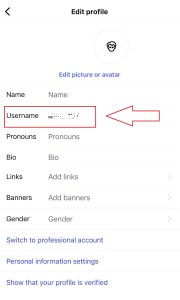
It’s easy process, make sure to check official Instagram Help Center guide if encountered any problem.
But here’s where people trip up. On the app (iPhone or Android), the Edit Profile button sits right under your bio. When you type in a new username, Instagram immediately checks if it’s free. Green checkmark? You’re golden. Red error? Time to get creative.
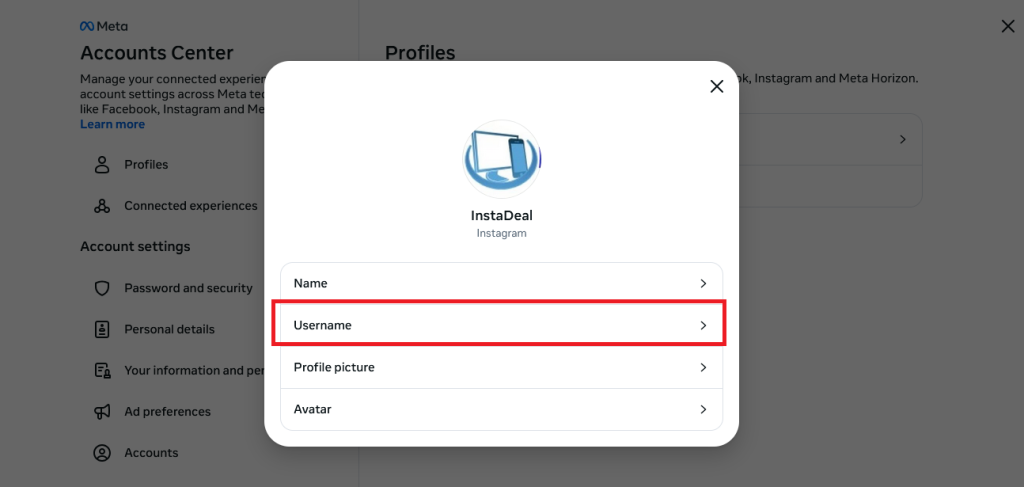
On desktop, the process is a bit different—log in at instagram.com.
Tap Edit Profile > Click on Personal Details> Choose your profile in Account Center> Click on Username
Instagram Username vs Display Name: What’s the Difference?
Instagram gives you two identifiers, and they serve different purposes. Your username (the @handle in your profile link) is unique and follows strict rules—no spaces, emojis, or symbols beyond underscores and periods—while your display name is the bold text at the top of your bio where you can use spaces, capital letters, or even emojis. In short, the username is your digital address (how people tag and find you), while the display name is your stylistic label that boosts discoverability when people search by name or keywords.
Here’s a quick example:
-
Username (handle): @alex_bakes
-
Display name: Alex’s Cookie Shop 🍪
Instagram Username Rules in 2025: What to Know Before Changing Your Name
Before you rush to lock in a new handle, there are a few ground rules Instagram enforces.
Here’s the breakdown:
-
Character limit: You’ve got 30 characters max. Shorter is usually better, but you’ve got some wiggle room.
-
Allowed symbols: Only letters, numbers, underscores (_), and periods (.). No spaces, no emojis, no special characters.
-
Uniqueness: Every username has to be one-of-a-kind. One extra underscore or period makes it different, which is why you’ll see endless variations floating around.
-
Change frequency: You can technically change your username whenever, but Instagram has a little quirk—you can only swap it twice within 14 days. After that, you’ll need to wait it out.
-
Review flag: If your account has a big following or is verified, Instagram might review your new handle before it goes live. That’s to stop impersonation and trademark headaches.
And here’s a sneaky bit: once you let go of a username, it’s fair game for anyone else. There’s no guarantee you’ll get it back later, so think twice before dropping an old brand handle.
What Happens After You Change Your Instagram Name (Mentions, Tags & Links)
The moment you hit save, your profile URL updates instantly—so old links to your account may break—while new mentions and tags will point to your fresh handle (though older ones stay linked to the old name and won’t auto-update). Followers and DMs remain intact, but you might see a short dip in search visibility as Instagram reindexes your profile; if your new handle doesn’t show on your own device right away, that’s just caching, and everyone else already sees the change.
How to Pick a New Instagram Name That Doesn’t Look Spammy
A few quick rules of thumb:
-
Keep it readable. Don’t jam in five underscores or swap every vowel for a number. Handles like
@_k3v1n_xx_aren’t memorable—they’re just a headache. -
Stick close to your name or brand. If you’re a freelancer, use your actual name (or a clean variation). If you’re a business, the brand name should come first, then add a keyword if you need to. Example:
@lunasbakeryor@lunasbakery_nyc. -
Make it consistent across platforms. If you’re already on TikTok, YouTube, or X (Twitter), try to grab the same handle everywhere. Saves people from hunting you down.
-
Short beats long. The 30-character limit sounds generous, but shorter handles are easier to type, remember, and tag.
Still stuck? Play around with an online username generator (Later and Hootsuite both have free tools). They’ll throw out variations based on your keywords, which can spark ideas even if you don’t use them directly.
And here’s a tip I don’t see mentioned enough: say your potential handle out loud. If it feels clunky, if you have to spell it three times, or if it makes you cringe, it’s probably not the right fit.
Best Practices for Choosing an Instagram Name: Branding & SEO Tips
Picking a handle isn’t just about avoiding embarrassment—it’s also about making yourself easy to find. Think of your Instagram username as both a name tag and a search keyword. Get it wrong, and people scroll right past.
A few best practices worth following:
-
Keep it consistent. If your business is “Bright Bean Coffee,” aim for
@brightbeancoffeeeverywhere—Instagram, TikTok, YouTube. The more consistent you are, the easier it is for people to type once and find you everywhere. -
Skip the fluff. Adding random numbers or extra underscores doesn’t help SEO, and it makes your handle harder to remember. Unless your brand is literally “Studio_23,” leave the digits out.
-
Lean on your bio for keywords. Instagram handles don’t have to cram in search terms. Instead, use your display name or bio to add context (e.g., “Bright Bean Coffee | Chicago”). That way you stay clean and show up in discovery.
-
Short + clear > clever but confusing. A pun might feel fun now, but if people can’t spell it or remember it, it kills discoverability.
Here’s a pro-level trick: Google your prospective handle before you commit. If it’s tied to something sketchy (like a dead website or a competitor in another industry), you’ll want to tweak it. Think of it as protecting your digital footprint.
If Instagram says your new name isn’t available, it’s usually because someone else has it, you’ve hit the “two changes in 14 days” limit, or the handle doesn’t meet character rules. Verified or high-reach accounts may also face review before the switch goes live. Quick fixes? Try a clean variation with a period, underscore, or location tag, avoid messy strings of numbers, and if you just changed twice—wait it out. If the app glitches, log in on desktop, clear cache, or give it a few hours.
Safety Tips: Instagram Name Changes, Trademarks & Impersonation Rules
Before you lock in a new handle, quick reality check: not every name is fair game. Instagram has clear rules around trademarks and impersonation and ignoring them can land your account in hot water.
If a business already owns the name you’re eyeing—and they’ve trademarked it—Instagram can take your account down if they file a complaint. Even if you’re not trying to impersonate, it still looks like infringement. Example: grabbing @nikegear when you’re not, well, Nike. Bad idea.
The same goes for pretending to be someone else. Adding “official” to your username doesn’t magically give you rights to use a celebrity or brand name. In fact, it makes you look more suspicious.
Here’s a simple gut-check before you hit save:
-
Does this name clearly belong to another company or public figure?
-
Would I be annoyed if someone else used this handle with my brand name?
-
Am I choosing it just because the original looks popular?
If you’re unsure, Instagram has a whole page on trademark complaints and reporting right here.
Instagram Name Change Checklist (What to Update After Switching)
Changing your handle is the easy part. Making sure the rest of your digital world doesn’t break? That’s the real job. Here’s a quick checklist you can literally copy into Notes and tick off:
-
✅ Update the link on your website (header, footer, contact page).
-
✅ Swap the handle in your email signature.
-
✅ Fix it in your link-in-bio tool (Linktree, Beacons, etc.).
-
✅ Update business cards if you still hand those out.
-
✅ Edit your other social profiles (TikTok, X, YouTube, Pinterest).
-
✅ Post a quick story or pinned post announcing the new handle.
-
✅ Check your highlight covers—if the old @ was baked into the design, redo them.
-
✅ Refresh any automated posts scheduled in third-party apps.
-
✅ Tell your collaborators or partners (saves them from tagging a dead account).
-
✅ Do a quick Google search for your old handle and see if you need to fix any stray mentions.
It looks like a lot, but you can knock this list out in under an hour. The trick is doing it fast so you don’t lose clicks or confuse your followers.
Pro tip: If you’re dealing with account transfers, make sure to read our guide on securing an Instagram account before buying one.
FAQs About How to Change Instagram Name (Real User Questions Answered)
Here are most common questions users ask about changing username, collected by InstaDeal team:
Why can’t I change my Instagram username right now?
Usually the name breaks Instagram’s rules, it’s already taken, you’ve hit the “two changes in 14 days” limit, or your account is under review—try again later or adjust the handle.
How long until a released username becomes available again?
Instagram only frees it if it hasn’t been taken by someone else or wasn’t just removed from another active account—there’s no guaranteed timer.
Do I lose followers if I change my username?
No—your followers stay
My new handle shows on friends’ phones but not mine—why?
That’s local cache; log out/in or wait a bit and it will display correctly.
I’m verified—why won’t Instagram let me change my username?
Verified or high-reach accounts can be restricted or held for manual review, which sometimes blocks changes temporarily.

Benjamin Amiri
Benjamin Amiri is a digital growth consultant and senior contributor at InstaDeal. He specializes in Instagram engagement strategies, Facebook ads innovation, and TikTok product marketing. With a track record of scaling brands and creator accounts, Benjamin turns performance data into actionable growth tactics that deliver measurable results.


