

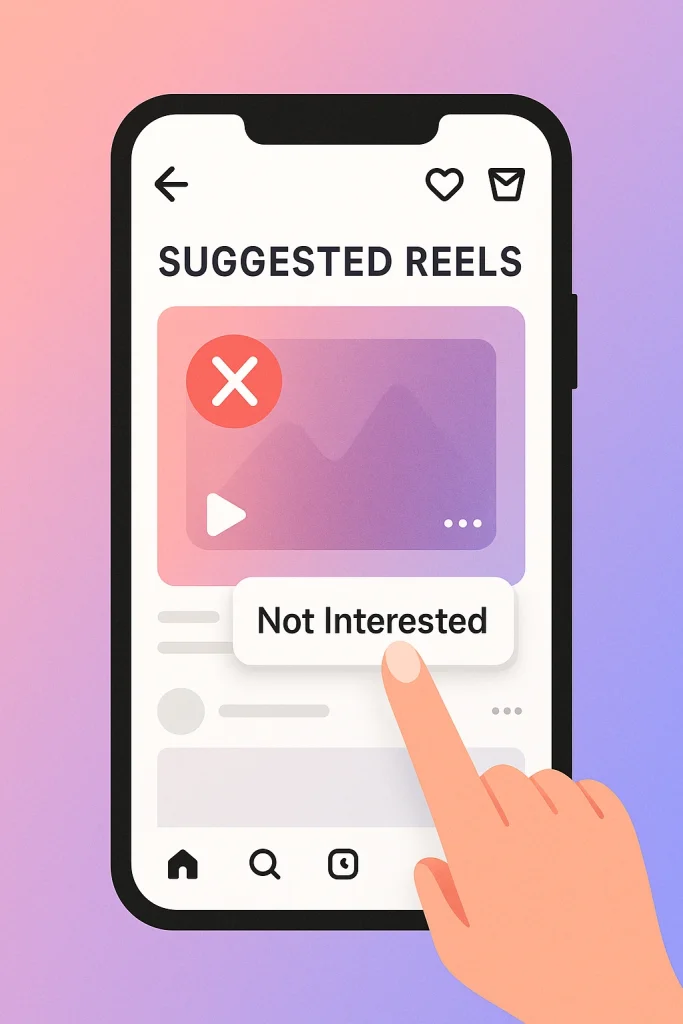

Can You Really Remove Suggested Reels on Instagram? (What’s Actually Possible in 2025)
No, you can’t completely remove Suggested Reels from Instagram in 2025. The app is built around Reels and recommendations, so there’s no single “off forever” switch. But you can seriously cut down how many you see and reset what Instagram recommends, using a mix of built-in tools that exist right now.
Instagram still injects recommended content, especially once you’ve caught up with posts from people you follow. But if you combine all methods discussed in this article, you can turn your Reels tab from “chaotic junk” into “mostly stuff I actually care about.”
This guide will walk through each method in plain language, with 2025-accurate steps, so you know what’s actually possible—and what’s just wishful thinking.
Why You Keep Seeing Suggested Reels on Instagram (How the 2025 Algorithm Works)
Suggested Reels are just Instagram’s recommendations engine in action. You see them because the app thinks, “You’ll probably watch this to the end… maybe even share it.” That’s it. No mystery, just math and behavior tracking.
In 2025, Instagram openly says it doesn’t use one big algorithm, but several systems that rank Feed, Reels, Explore and more using different “signals” like what you watch, like, save, share and who you interact with most. Reels in particular are built for entertainment, so the system is obsessed with how long you watch, whether you replay, if you share it, and if it inspires you to make a similar Reel.
Instagram tracks things like:
-
Watch time: Do you finish the Reel or swipe away in two seconds?
-
Replays & shares: Did you watch it again or DM it to someone?
-
Likes, saves, comments: Classic “I enjoyed this” signals.
-
Who and what you follow: Accounts, topics, hashtags, even sounds.
-
Negative feedback: Tapping Not Interested or reporting content sends strong “less of this” signals.
The algorithm then looks at millions of other people who behaved like you and asks, “What did they enjoy?” That’s where a lot of those random-but-weirdly-relevant Suggested Reels come from.
If you’re serious about controlling your Instagram experience—or even building one from scratch—platforms like InstaDeal, a trusted Instagram accounts marketplace, make it easier to start with accounts already aligned to your goals.
Method 1 – How to Remove Suggested Reels on Instagram Using Settings (Snooze & Content Preferences)
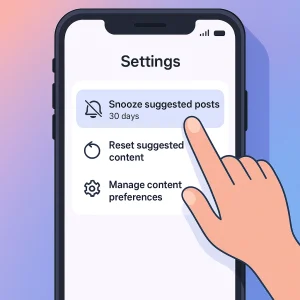
If you’re looking for a setting that actually tones things down, this is it. There isn’t a literal “Turn off Suggested Reels” button in 2025, but Instagram’s Content preferences give you two powerful tools:
-
Snooze suggested posts in feed for 30 days
-
Reset suggested content across Feed, Reels, and Explore
Step-by-Step: Using Content Preferences & Snooze
On most updated apps, the path looks like this:
-
Go to your profile (bottom-right avatar).
-
Tap the menu (three lines) → Settings and activity.
-
Scroll to What you see → Content preferences or Content suggestions.
-
Here you’ll usually see:
-
Snooze suggested posts in feed → hides suggested posts in your main feed for 30 days.
-
Reset suggested content → clears your current recommendations so Instagram rebuilds them from scratch.
-
You can also reach this from a single suggested post or Reel: tap the three dots (⋯) → Manage content preferences → Snooze / Reset.
Does this kill Suggested Reels forever? No. But for your home feed, snoozing is the closest thing to “off,” and resetting wipes out all the weird training data you’ve accidentally given the app over time.
Method 2 – Use Not Interested to Remove Suggested Reels on Instagram Faster
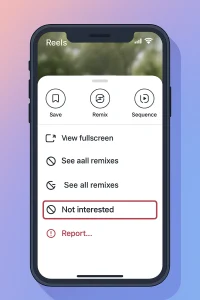
If you only change one habit, make it this: start hitting “Not Interested” on every Reel you don’t want more of. It feels small and a bit pointless, but in 2025 this is still one of the strongest negative signals you can send to Instagram’s recommendation system.
The Fast In-Feed Fix
You can’t delete Suggested Reels, but you can teach Instagram what to stop showing you by actively rejecting bad recommendations.
On almost every suggested Reel or post you see:
-
Tap the three dots (⋯) on the Reel or suggested post.
-
Tap Not interested (sometimes phrased as “Not Interested in this post” or similar).
-
Optionally choose a reason like I see too many posts like this or I don’t like this topic if Instagram asks.
That does two things behind the scenes:
-
It reduces similar content from your feed, Reels, and Explore.
-
It adds to a pattern: the more consistently you reject a topic or style, the stronger the “no thanks” signal becomes.
Engagement Hygiene: What to Stop Doing
Honestly, this is where most people sabotage themselves.
Even if you tap Not Interested sometimes, you might be quietly telling Instagram the opposite through your behavior. Try to avoid:
-
-
Hate-watching drama Reels to the end “just to see how bad it gets.”
-
Replaying content you dislike (replays scream “this is engaging”).
-
Liking, saving, or sharing stuff that annoys you “ironically.”
- Letting Reels autoplay while you’re distracted—Instagram still counts that watch time.
-
Method 3 – Reset Suggested Content to Remove Irrelevant Reels on Instagram (2025 Update)
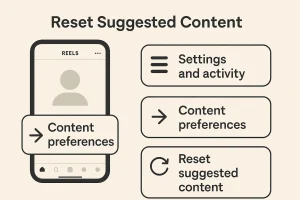
If your feed feels completely “cursed” and nothing you do seems to fix it, this is the nuclear option: reset your suggested content. In 2025, Instagram has an official feature that lets you clear the recommendation history it uses for Reels, Explore, and your main feed and start fresh.
If you want to go even deeper, this step overlaps closely with learning how to reset the Instagram algorithm entirely, not just for Reels but for Explore and suggested posts as well.
Step-by-Step: Resetting Suggestions in 2025
On most current versions of the app, the path is:
-
Go to your profile (bottom-right).
-
Tap the menu (three lines, top-right) → Settings and activity.
-
Scroll to What you see → Content preferences or Suggested content.
-
Tap Reset suggested content.
-
Follow the prompts (it may ask you to quickly review who you follow or certain topics) and confirm.
You can also sometimes get there from a suggested post: ⋯ → Manage content preferences → Reset suggested content.
What Happens After You Reset (And How Not to Ruin It)
Right after a reset, your feed and Reels will probably feel… generic. Lots of broad, trending content. That’s normal. Instagram just lost years of training data and is scrambling to learn you again.
This is the crucial bit people miss:
-
Be picky for the next few days. Only watch, like, or save content you actually want more of.
-
Hit “Not Interested” fast on anything that feels off. (Method 2 suddenly matters a lot more.)
-
Avoid doomscrolling “just because you’re bored.” Every second you linger is a vote.
Method 4 – Edit ‘Your Algorithm’ to Remove Unwanted Suggested Reels on Instagram
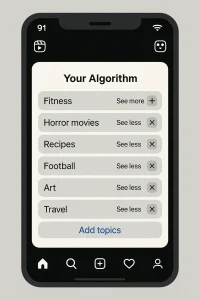
Here’s the big 2025 update: yes, you can now directly edit the topics your Reels algorithm uses – at least if you’re in the US or in a region where the rollout has started. Instagram’s new “Your Algorithm” tool shows you a list of what it thinks you’re into and lets you tweak it on the spot.
Instead of only guessing from your watch history, Instagram now:
-
Shows you a dashboard of topics (like “fitness”, “horror movies”, “recipes”, “football”)
-
Lets you say “see more of this” or “see less of this”
-
Lets you remove bad matches and add interests that are missing
That means you’re not just passively training the algorithm anymore. You’re literally editing its “cheat sheet” about you.
How to Use “Your Algorithm” on Reels
When your account has access, the flow is simple:
-
Open the Reels tab.
-
Play any Reel.
-
Look for the small icon in the top-right that looks like two lines with hearts (or tap ⋯ then Your Algorithm on some versions).
-
Tap it to open your Your Algorithm dashboard.
-
Remove topics you don’t want, boost ones you do, and optionally add new ones.
Rollout status (as of December 2025):
-
Fully live in the US
-
Rolling out to English-speaking users globally over time, so some regions will see it later
Used together with Not Interested and Reset suggested content, this feature is like giving your Reels feed a steering wheel instead of just tapping the brakes.
Method 5 – Change Who You Follow to Reduce Suggested Reels on Instagram
So if you want fewer chaotic Suggested Reels, you have to change what you follow, what you watch, and what you boost with your engagement.
Follow (and Unfollow) With Intention
If you follow a lot of meme pages, drama accounts, or low-effort trends, Instagram will assume that’s your thing—and it’ll hunt for more of it.
A few simple but powerful moves:
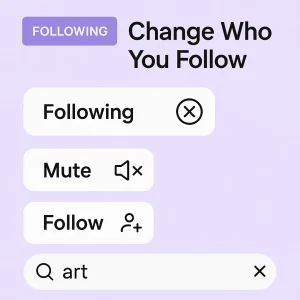
-
Unfollow accounts that always pull you into content you regret watching.
-
Mute people you don’t want to unfollow but whose content drags your feed in the wrong direction.
-
Actively follow creators in topics you want more of (fitness, art, learning, niche hobbies, etc.).
Instagram’s own documentation is clear: who you follow and how you interact with them is a major signal for what you see in Feed, Reels and Explore. Watching, liking and commenting on certain creators tells the system, “find me more like this.” Some users go a step further and choose to start fresh by buying an Instagram account in a specific niche—something you can explore through curated Instagram accounts for sale based on interests, audience type, and content style.
This is the part people forget: your searches and hashtag browsing also teach the algorithm.
If you keep searching for drama, call-out content, or random viral stuff “just to see what’s happening,” Instagram doesn’t know you’re hate-watching. It just sees strong interest.
Instead:
-
Search for topics you genuinely want your Reels to lean into.
-
Spend more time on those profiles and save the posts you like.
-
Avoid diving into hashtags you don’t want more of, even “just once.”
Think of it this way: every follow, every watch, every save is a small yes. Change enough of those yeses, and your Suggested Reels will slowly—but noticeably—follow.
Turn Off Reels Notifications to Limit Suggested Reels on Instagram
If Suggested Reels don’t just flood your feed but also spam your notifications, that’s a double hit on your attention.
Turn Off Reels Push Notifications in the App
You can stop Instagram from pinging you every time there’s a new Reel or “a reel you might like” by adjusting your notification settings.
On the current Instagram layout, do this:
-
Go to your profile (bottom-right).
-
Tap the menu (three lines) → Settings and privacy / Settings and notifications (label varies slightly).
-
Tap Notifications.
-
Open Posts, stories and comments or a similar section.
-
Look for Reels options and set them to Off (or, at minimum, “From people I follow” instead of “From everyone”).
This stops Instagram from sending you push alerts when:
-
Someone posts a new Reel (unless you explicitly turned notifications on for that person).
-
Instagram wants to promote “a reel you might like.”
If a specific creator’s Reels keep triggering alerts, open their profile → bell icon / Notifications → Reels and turn those off too.
Reduce Distraction Beyond Instagram
If you really need a break, you can also:
-
Use your phone’s OS settings to limit Instagram notifications altogether, or put the app in a focus / quiet mode.
-
Move Instagram off your home screen so you’re not opening Reels on autopilot.
You’ll still see Suggested Reels when you open the app, but they’ll stop yanking your attention every hour “just to show you something new.”
FAQs About Removing Suggested Reels on Instagram (Real Problems People Actually Ask)
I went through recent guides, Reddit threads, and newer 2025 blog posts, and these are the questions people keep tripping over, brought to you by InstaDeal:
Can I permanently turn off Suggested Reels on Instagram?
No. There’s still no official, permanent “off forever” switch for Suggested Reels in 2025.
Why is my feed “all suggested reels” instead of posts from people I follow?
Instagram has been pushing more recommended content into the main feed, especially when you’ve seen recent posts from people you follow. Some users report that they get multiple blocks of “Suggested Reels” every few posts.
Why do I keep getting disturbing / NSFW / triggering Reels, and can I block them?
Unfortunately, you’re not the only one asking this. Reddit is full of complaints about graphic or sexual Reels showing up out of nowhere.
No, there’s no public “clear Reels watch history” button. If changes feel slow or inconsistent, it can help to clear Instagram cache, which removes stored data that sometimes interferes with recommendation updates.
Why do “turn off Suggested Reels” guides all say slightly different things?
Because Instagram’s UI and options change constantly, and features roll out in waves.

Alex Morris
Alex Morris is a social media strategist and lead writer at InstaDeal. He specializes in Instagram, TikTok, and creator monetization trends, helping influencers and brands grow smarter online. With over 10 years of digital marketing experience, he simplifies complex topics into practical insights.


