


Introduction: Temporary vs. Permanent Instagram Bans
A temporary Instagram ban restricts actions like liking, following, or commenting for a short period — usually 24 to 48 hours. A permanent ban means your account is disabled or deleted, often for repeated or serious violations, and recovery is difficult or impossible.
That’s the core difference.
If you’ve been suddenly logged out or received a warning, it’s natural to panic. But not every ban is permanent. Instagram uses temporary restrictions to slow down suspicious behavior — things like rapid activity, using automation tools, or posting content that pushes boundaries. These bans are warnings.
A permanent ban, though, is final. You might lose access entirely with no clear explanation. This usually follows major violations: hate speech, impersonation, spam networks, or repeated guideline breaches. Once it happens, your appeal options are limited — and account recovery isn’t guaranteed.
Still, many users confuse the two. Instagram doesn’t always spell things out. That’s where this guide comes in.
How to Tell If Your Instagram Ban Is Temporary or Permanent
🔄 Signs of a Temporary Ban
A temporary ban — often called an “action block” — usually restricts specific behaviors, not your entire account. These are the signs:
-
You can still log in to your account.
-
A message says something like “Action Blocked,” “Try again later,” or “We restrict certain activity.”
-
You can view your profile but can’t like, comment, follow, or send DMs.
-
The ban lasts between a few hours and a few days — most commonly 24–48 hours.
-
After the time passes, everything returns to normal.
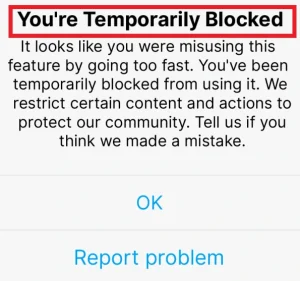
Common triggers:
-
Liking or following too many accounts too quickly
-
Using third-party automation tools
-
Repeatedly posting similar comments or DMs
-
Violating community guidelines in minor ways (e.g., inappropriate captions)
❌ Signs of a Permanent Ban
-
You’re logged out, and Instagram says your account “doesn’t exist” or is “disabled.”
-
You can’t log back in — even after password resets.
-
You may get a message saying your account violated terms and has been removed.
-
Your profile URL no longer leads anywhere — it shows a 404 error.
-
Friends can’t find your account on search.
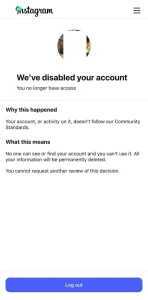
Common causes:
-
Repeated violations of Instagram’s Community Guidelines
-
Posting hate speech, nudity, graphic violence, or fake news
-
Impersonating someone or operating fake accounts
-
Using aggressive bot automation
-
Mass-reporting by other users (true or false)
⚠️ Still Not Sure?
If you’re unsure, try these steps:
-
Log in from a different device or browser
-
Visit your profile URL directly (instagram.com/your username)
-
Use Instagram’s “My Account Was Deactivated” form to appeal or check status
If you can still access your account, it’s likely temporary. If everything’s gone — and the username no longer exists — it’s probably permanent.
What Triggers Instagram to Ban an Account?
1. Rapid, Bot-Like Activity
Instagram monitors behavior that looks automated — like following hundreds of accounts in an hour, mass-liking posts, or leaving copy-paste comments.
Examples:
-
Following/unfollowing in large bursts
-
Liking 100+ posts in a few minutes
-
Using engagement pods or comment bots
This usually leads to a temporary ban, but repeat behavior can escalate.
2. Using Third-Party Tools That Break Instagram’s Rules
Risky behaviors include:
-
Auto-follow/unfollow tools
-
Scheduler apps that aren’t Meta-approved
-
Account “boosting” services
-
Bots for DMs or story views
Instagram’s system (and Meta’s AI, like SpamBrain) is getting better at detecting these.
3. Violating Community Guidelines
Content that’s likely to get flagged:
-
Nudity, adult content, or sexual solicitation
-
Hate speech, threats, or harassment
-
Misinformation or fake news
-
Graphic violence or disturbing imagery
-
Copyright infringement
Instagram’s Community Guidelines are strict — and violations, especially around intellectual property, can quickly lead to restrictions or even a permanent ban. Copyright violations in particular are becoming a major reason for bans in 2025.
4. Fake Accounts or Identity Misuse
Creating accounts that impersonate others — even as a parody — can get you reported and removed. So can running bots or spam networks.
High-risk signs:
-
Using stock profile photos
-
Copying content from other creators
-
Linking to spammy websites
-
Mass DMs or suspicious profile bios
If Instagram suspects you’re not a “real person,” your account could be permanently shut down.
5. Getting Reported by Other Users
Sometimes, bans are triggered by mass reports — whether the complaints are valid or not. If enough people report your posts, stories, or messages, Instagram will review your account and take action.
Even if you’re following the rules, consistent reports can lead to restrictions.
Can You Recover a Banned Instagram Account?
The approach depends entirely on whether the ban is temporary or permanent:
✅ How to Fix Instagram’s “Action Blocked” Error (Temporary Ban)
If you’re seeing “Action Blocked” when trying to like, comment, follow, or DM — it’s a temporary restriction, not a full ban. Instagram is flagging your account for suspicious behavior, but you’re not banned yet.
Here’s what to do:
-
Stop all activity immediately
Continuing to interact with the app aggressively will extend the block — or escalate it to a real ban. -
Don’t use third-party apps
Disconnect any bots, schedulers, or tools that might be automating actions. -
Wait it out
Most action blocks last 24–48 hours. Rare cases can last up to a week. Just give your account time to cool down. -
Switch to mobile data or a different IP
If Instagram flagged your IP, using a different network might restore functionality faster. -
Report the problem (optional)
You can go to Settings > Help > Report a Problem and let Instagram know you’re being mistakenly blocked — but don’t expect an instant fix. -
Review your behavior
Going forward, keep actions more organic. Avoid follow/unfollow cycles, repetitive comments, or spammy captions.
⚠️ Appealing a Permanent Instagram Ban
If your account was disabled or deleted and you can’t log in at all — this is a permanent ban, and the process gets tougher.
Steps to try:
-
Use Instagram’s official appeal form
Go to https://www.instagram.com/accounts/login
If it says your account was disabled, follow the on-screen instructions to request a review. -
Try the Facebook Business Support route
If your account was connected to a Facebook Page or ad account, use Meta’s Business Help Center to file a support ticket. This is often faster than going through Instagram’s app. -
Submit photo verification (if asked)
Instagram may ask for a selfie holding a code. Make sure the image is clear, well-lit, and matches your profile info. -
Be patient — and polite
Instagram rarely gives updates. You may need to wait days (sometimes weeks). Avoid submitting the appeal form multiple times a day — it can hurt your chances.
Consider third-party recovery assistance
If you’ve exhausted the official options and still haven’t gotten a reply, some users turn to specialized services that help with Instagram account recovery. For example, InstaDeal’s Unban Service has been used by creators and business owners looking to escalate appeal efforts or navigate the reinstatement process more effectively.
How to Avoid Getting Banned on Instagram in the Future
1. Avoid Bot-Like Behavior
If you’re acting like a bot, Instagram will treat you like one.
Play it safe by:
- Not following/unfollowing in large batches
- Spacing out your likes, comments, and DMs
- Avoiding duplicate or spammy messages
- Staying away from engagement pods or automation tools
2. Don’t Use Unofficial Third-Party Apps
If you’re using follower boosters, auto-engagement services, or unauthorized scheduling apps, you’re risking an instant ban.
3. Follow Community Guidelines — Even the Gray Areas
Instagram doesn’t just ban accounts over obvious things. Sometimes, suggestive content, borderline memes, or controversial opinions can get flagged — especially if they’re mass-reported.
Play by the rules:
- Avoid anything that could be seen as hate speech, harassment, nudity, or graphic content
- Credit your sources and avoid copyright violations
- Don’t impersonate or create fake accounts — even for parody
One post might not get you banned, but a pattern will.
4. Monitor Your Account Health
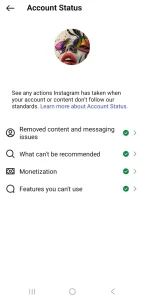
Instagram doesn’t give you a full “account score,” but you can still keep an eye on your standing.
Go to:
Settings → Account → Account Status
This section will show if you’ve had content removed or are close to a restriction. If you see warnings, take them seriously.
FAQs About Temporary vs. Permanent Instagram Bans
1. How long does a temporary Instagram ban last?
Most temporary bans — like action blocks — last between 24 to 48 hours.
2. Can Instagram permanently ban you without warning?
Yes. While Instagram sometimes gives warnings or temporary blocks first, it can issue a permanent ban without prior notice — especially for serious violations like hate speech, impersonation, or spam.
3. How many violations does it take to get banned on Instagram?
There’s no fixed number. Instagram uses a strike-based system, but it’s not publicly documented.
4. Can I get my Instagram account back after a permanent ban?
Sometimes — but not always. You can try appealing through Instagram’s in-app form or the Meta Business Help Center. If those fail, some users turn to services like InstaDeal to escalate recovery efforts.
5. Will creating a new account help after a permanent ban?
Yes — but be careful. Use a new email and phone number, and avoid linking the new account to the same IP address or devices if possible.

Ali Afshar
Ali Afshar is the co-founder and writer at InstaDeal. With a background in social media data analysis and trend forecasting, Ali creates evidence-driven insights to help brands, influencers, and entrepreneurs grow faster and smarter online.


